
Walk into almost any finance, claims, or operations team and you will see the same bottleneck in different forms. A shared-services team manually enters invoice totals into an ERP. A claims team works through scanned forms and handwritten notes. A customer onboarding desk waits days, sometimes weeks, because someone still has to review identity documents by hand.
The documents may differ, but the problem is the same. High-volume document work eats up time, slows down processes, and creates errors that quietly add cost across the business.
That is where intelligent document processing comes in. Intelligent document processing, or IDP, helps teams capture, read, validate, and move document data into business systems. Combined with Robotic Process Automation, it can turn document-heavy back-office work into a faster, more reliable workflow.
This guide is written to support a practical decision. You will see how OCR, ICR, IDP, and RPA fit together, which document workflows are worth automating first, and what a sensible pilot should look like.
The timing matters. In a 2025 AIIM and Deep Analysis survey of 600 large enterprises in the US and Europe, 65% of organizations were already considering or implementing IDP, while 78% were using some form of AI in document management. Yet the same study found that 61% of document processes still relied on paper, with nearly half of respondents expecting paper volumes to increase. The direction is clear: businesses are moving beyond basic capture and OCR tools toward systems that can understand documents from end to end.
A simple test helps. If your cost per invoice is above $10, your exception rate is above 20%, or onboarding takes weeks instead of days, the business case for automation may already be visible. The real question is not whether to automate. It is where to begin.
Why Plain RPA Struggles with Documents
Robotic process automation works best when the task follows a fixed pattern. A bot can log into a system, copy a value, paste it into another field, click submit, and repeat the same steps without slowing down. For structured, predictable work, RPA is fast, reliable, and cost-effective.
Documents are different. They rarely follow one clean format. One supplier may place the invoice total at the bottom of the page, while another may place it near the header. A scanned form may be tilted. A handwritten claim may be difficult to read. A line-item table may continue across several pages. For a human, these are small variations. For a rule-based bot, they are major obstacles.
This is where many automation projects begin to struggle. A process can look simple during planning, but once real-world documents enter the workflow, exceptions start to pile up. The bot is not necessarily the problem. The problem is expecting documents to behave like structured database fields.
RPA can act on information, but it cannot understand a document by itself. For document-heavy work, it needs an OCR or IDP layer before it. That layer reads the document, identifies the right information, validates the extracted data, and sends clean inputs to the bot. Once that happens, RPA can do what it was built for: move the process forward quickly and consistently.
The IDP Stack Explained: OCR, ICR, IDP, and RPA
OCR, ICR, IDP, and RPA are often discussed as if they compete with one another. In practice, they play different roles in the same automation flow.
- OCR, or Optical Character Recognition, converts printed text from an image or scanned document into machine-readable text. It works well for clean, fixed-format documents, but its performance drops when layouts vary.
- ICR, or Intelligent Character Recognition, is built to read handwriting. It is useful for claim forms, application forms, signed documents, and records that contain handwritten information.
- IDP, or Intelligent Document Processing, goes further. It does not simply read text. It identifies the document type, finds the right fields, validates the extracted data, and applies business rules. IDP combines OCR, ICR, machine learning, natural language processing, and in some cases, large language models.
RPA takes the validated data and performs the next action. It may post an invoice into an ERP, update a claim record, send an exception for review, or move a case to the next stage.
| Layer | What it reads | Strength | Limitation |
|---|---|---|---|
| OCR | Printed text | Fast, mature, and cost-effective | Struggles with changing layouts |
| ICR | Handwriting | Useful for forms and handwritten inputs | Needs good scan quality |
| IDP | Structured and unstructured documents | Classifies, extracts, validates, and understands context | Needs training and tuning |
| RPA | Structured data | Executes repetitive actions at scale | Cannot interpret documents on its own |
The aim is not to choose one layer over another. A mature automation setup uses them together. OCR and ICR read the content. IDP understands and validates it. RPA acts on the validated data.
High-ROI Use Cases for Document Processing Automation
Document processing automation delivers the strongest return where volume is high, rules are clear, and exceptions are expensive.
Three use cases usually stand out.
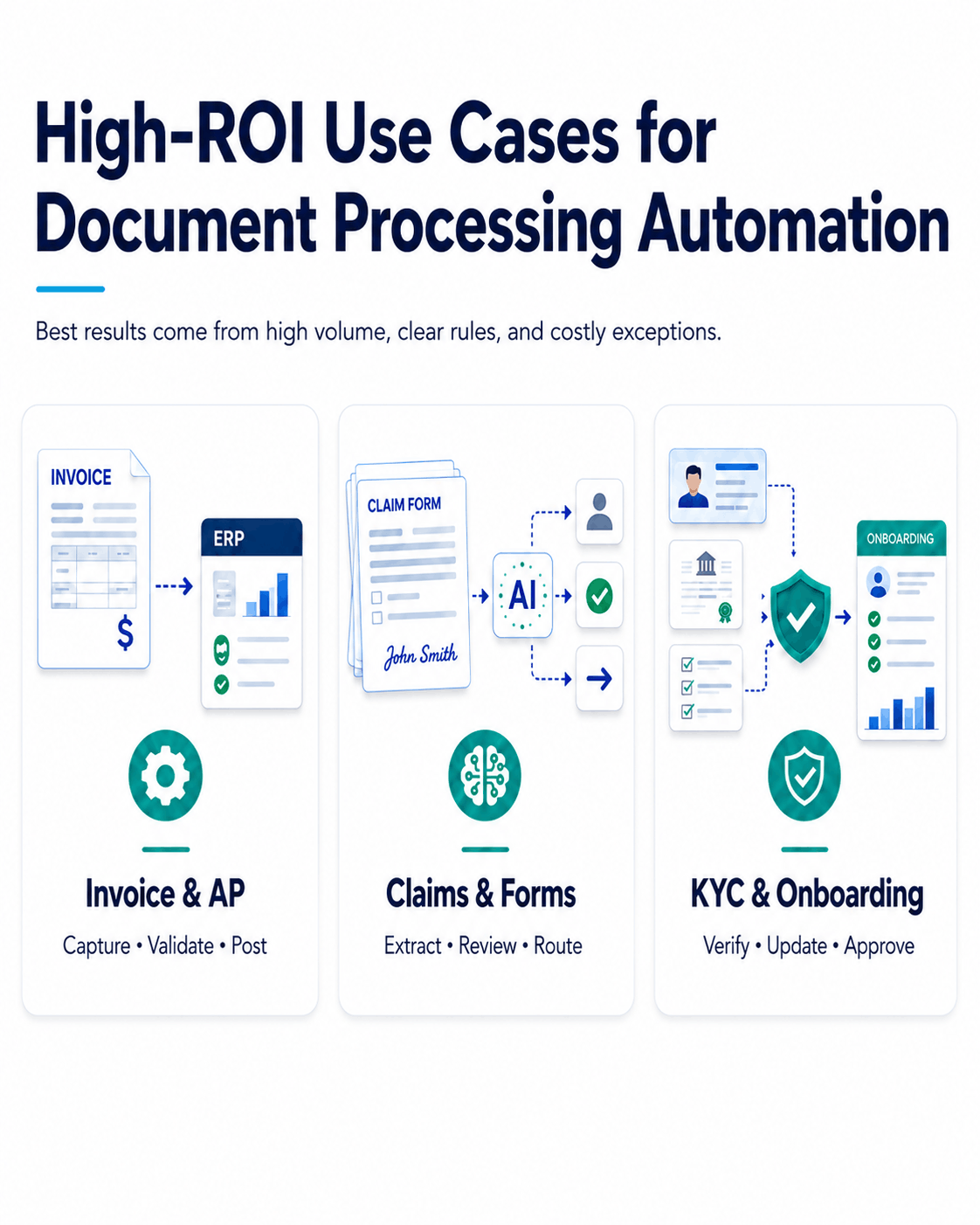
Invoice and AP Automation
Accounts payable is one of the most common starting points for IDP and RPA automation. Every business processes invoices, and many still depend on manual entry, approval follow-ups, and repeated checks against purchase orders or ERP records.
With IDP, invoices can be captured from email, portals, scans, or shared folders. The system can extract supplier details, invoice numbers, dates, tax amounts, line items, totals, and purchase order references. It can then validate those values against ERP data before RPA posts the invoice or routes it for approval.
The payoff is usually easy to measure: less manual entry, shorter approval cycles, lower processing costs, and early-payment discounts that become easier to capture.
Claims and Forms Processing
Insurance, healthcare, and government teams handle large volumes of forms in inconsistent formats. Some are scanned. Some are handwritten. Some arrive incomplete. Others include supporting documents that need to be reviewed together.
IDP classifies these documents, extracts the relevant fields, and flags missing or low-confidence information. ICR helps read handwritten sections, while RPA updates the claims system, creates tasks, assigns the case, or moves it to the next step.
The result is not simply faster processing. It is a better use of human attention. Reviewers spend less time on routine intake and more time on cases that genuinely need judgement.
KYC and Onboarding Documents
Customer onboarding often slows down at the document review stage. Teams must collect identity documents, incorporation records, beneficial ownership details, address proofs, tax documents, and other supporting files. Each document has to be read, verified, and matched against internal or external data.
IDP extracts and validates the key fields. RPA then updates CRM, compliance, or core-banking systems with the verified information.
For onboarding teams, the value is not only cost reduction. Faster document handling reduces delays that can cause customers to abandon the process before it is complete.
Recognize your own workflow in any of these? You do not need to commit to a full automation programme to find out whether the numbers work. Start with one workflow, test the business case, and build from there.
Bring us the document process that slows your team down the most. In a 30-minute consultation, our automation experts will help you identify the best place to start, outline what the pilot could look like, and give you a practical view of whether the numbers work.
How to Build an IDP and RPA Pipeline?
A working IDP and RPA pipeline usually has four stages: capture, extract, validate, and act.
1. Capture
This is where documents enter the workflow. They may arrive through email inboxes, scanners, portals, EDI systems, mobile uploads, or shared folders.
The system should receive these documents, clean the image where needed, correct skewed scans, and identify the document type. Without a clean capture process, the rest of the workflow becomes unreliable.
2. Extract
Once the document is captured, OCR, ICR, and IDP models pull the required fields.
For an invoice, that may include supplier name, invoice number, date, line items, tax amount, total, and payment terms. For a claim, it may include policy number, claimant details, date of incident, treatment codes, or supporting notes.
Each extracted value should carry a confidence score. That score helps decide whether the system can proceed automatically or whether the field needs human review.
3. Validate
Extraction alone is not enough. The system must check whether the data is correct and usable.
- Does the purchase order exist?
- Do the invoice totals match the line items?
- Is the tax ID valid?
- Is a required field missing?
This is the stage that separates a demo from a production-ready workflow. A model can show strong field-level accuracy, but if the wrong fields fail, the document still needs manual review. That is why teams should measure straight-through processing rate, not just extraction accuracy.
4. Act
Once the data is validated, RPA takes over.
The bot can post the invoice, update the claim, create a customer record, assign a case, send a notification, or route an exception to the right person.
This is where document understanding becomes business action.
Proof in Practice: How One of Our Clients Automated EOB Data Entry
One of our healthcare clients was spending hours manually entering Explanation of Benefits data into its eClinicalWorks EHR system. Each EOB included details such as insurance payments, patient responsibility, payment dates, and adjustment information. Entering all of this by hand made the process slow, repetitive, and prone to errors.
Nalashaa Solutions built an OCR and RPA bot using UiPath to automate the workflow. The bot reads each EOB document, extracts the required data, enters it into the correct eClinicalWorks fields, and sends the team a success or failure status after every run.
The result was a faster and more reliable EOB posting process. Manual data entry was removed from the workflow, errors were reduced, turnaround time improved, and one bot took over work that previously needed several people.
Where Human-in-the-Loop Validation Fits
A good IDP setup does not try to remove humans completely on day one. It uses them where they add the most value.
That reflects how most organizations actually use the technology. In the 2025 AIIM survey, the top benefit cited was reduced processing time, at 50%. Far fewer respondents, at 30%, pointed to workforce reduction. The goal is usually faster, more reliable work, not simply fewer people.
Human-in-the-loop validation works through confidence scores. If the system is confident about a field, it processes it automatically. If the confidence score is low, the field goes to a reviewer.
The reviewer sees the extracted value next to the original document and can confirm or correct it quickly. Over time, those corrections improve the model.
This is especially important for critical fields such as account numbers, invoice totals, tax IDs, policy numbers, and patient identifiers. These usually need higher confidence thresholds than low-risk fields such as descriptions or comments.
The best systems are not the ones that avoid human review completely. They are the ones that send only the right exceptions to humans and improve with every correction.
Which Document Workflow Should You Automate First?
This is the decision many teams get stuck on. A simple scoring method helps. Evaluate each candidate workflow against three questions and start with the one that scores highest.
1. Is the volume high and recurring?
Automation pays back on repetition. A document type handled hundreds of times a month is usually a stronger candidate than one that appears occasionally, even if the occasional case feels painful.
2. Are the rules stable?
If the steps a person follows are consistent and can be written as rules, the workflow is a good candidate. If every case depends on judgement, it may not be the best first project.
3. Are exceptions and delays expensive?
The strongest candidates are workflows where mistakes create rework, penalties, compliance risk, late-payment fees, or customer drop-off. When delays are expensive, the savings are easier to defend.
A workflow that scores high on all three is usually where the business case is clearest. Invoice and AP processing is a classic example. The better move is rarely to automate everything at once. It is to pick one high-value workflow, prove the value, and then expand.
That single, well-chosen pilot builds internal confidence and creates the business case for everything that follows. It also reflects how the market now buys. Even as teams use AI-assisted research to build shortlists, proof-of-concept testing on real documents remains the deciding step.
Build Versus Buy: Why the Integrator Matters
At first glance, intelligent document processing looks like a software purchase. In practice, it is an operating-model decision.
Buying an IDP tool and an RPA platform does not automatically create an automated back office. Someone still has to map the process, clean up document flows, tune the models, define validation rules, build exception queues, integrate with ERP or CRM systems, and govern the bots after go-live.
This is where many projects fall short. The technology may work well in a demo, but production documents are messy. They include poor scans, inconsistent formats, missing fields, handwritten notes, unusual layouts, and business exceptions that were never part of the demo dataset.
The 2025 AIIM survey points to the same reality. More than half of organisations flagged a shortage of technical and process-redesign skills as a barrier. They also ranked data security and integration with core systems such as ERP, CRM, and ECM among their top concerns.
None of those problems are solved by a tool alone.
An integrator closes the gap by looking at the full workflow, not just the extraction step. That includes deciding which documents to automate first, what accuracy thresholds to use, where human review is needed, how exceptions should be handled, and how data should move into downstream systems.
That is what turns IDP and RPA from a tool implementation into a working automation programme.
The 2026 Signal: From Validation Queues to Agentic Document Workflows
The validation workflows being built today are also preparing businesses for the next stage of automation.
Document automation is moving beyond extraction. The next step is agentic document workflows, where systems do more than read a document. They reason across documents, decide the next action, and complete parts of the process with limited human involvement.
That future still needs a strong foundation. If capture is messy, extraction is unreliable, validation rules are unclear, and governance is weak, agentic workflows will only create more risk.
The basics still matter: clean document intake, tuned extraction, human-in-the-loop validation, and clear governance. The teams that get those foundations right today will be better placed to adopt advanced document automation safely tomorrow.
Client Story: Automating High-Volume Invoice Processing for a Global Shipping Company
One of our clients, a Seattle-based global container shipping company, was losing time and revenue to a heavily manual billing process. The team handled more than 170,000 invoices every month, with invoices generated, checked, and followed up by hand. Delays and inaccuracies were not just internal process issues. They were beginning to affect client relationships.
Nalashaa Solutions automated the workflow using OCR and RPA bots built with UiPath and Google Tesseract. The bots classify invoices, read invoice data with 98 to 99% accuracy, store the information in the cloud, validate each invoice against predefined business rules, update the ERP, and route failed validations to the right person for review. The system also sends a daily processing report, while validation data feeds a machine-learning loop that helps the bots improve over time.
The result was a faster, more accurate, and more scalable billing process. The client reduced manual effort, improved invoice accuracy, accelerated processing, and gained a workflow that could keep up with enterprise-level invoice volumes.
Ready to Find Your Highest-ROI Document Workflow?
If your teams are spending too much time keying data from invoices, claims, onboarding documents, or forms, the business case for automation is probably already there. The real question is not whether to automate. It is where to start.
Nalashaa Solutions works across the full automation stack, including OCR, ICR, IDP, and RPA, to build document processing pipelines around your real documents, systems, and process rules. The aim is not to create a polished demo that stops after the pilot. The aim is to identify one workflow with clear ROI, prove the value, and build a path to scale.
Bring us the document process that slows your team down the most. In a 30-minute consultation, our automation experts will help you identify the best place to start, outline what the pilot could look like, and give you a practical view of whether the numbers work.
Frequently Asked Questions
What is intelligent document processing?
Intelligent document processing is a technology approach that reads, classifies, extracts, and validates data from documents automatically. It combines OCR, ICR, machine learning, natural language processing, and large language models to handle structured, semi-structured, and unstructured documents.
How is IDP different from OCR and RPA?
OCR reads text from scanned documents or images. RPA performs rule-based actions using structured data. IDP sits between them. It understands the document, extracts the right fields, validates the data, and passes clean information to RPA for action.
What documents can IDP automate?
IDP can automate invoices, purchase orders, receipts, insurance claims, application forms, onboarding documents, KYC files, bills of lading, remittance advices, contracts, and medical records. It works best when there is enough document volume and a clear business process behind it.
How accurate is automated invoice processing?
Accuracy depends on document quality, layout variation, training data, and validation rules. Mature IDP systems can reach high field-level accuracy after tuning, but businesses should measure performance on their own production documents. Straight-through processing rate is often a better metric than raw extraction accuracy.
How does human-in-the-loop validation work?
Every extracted field receives a confidence score. If the score is high, the system processes it automatically. If the score is low, the field is sent to a reviewer. The reviewer confirms or corrects the value, and those corrections help improve the model over time.