See who's buying, how often, and why some customers stick around while others don't. Predictive analytics can flag which customers are at risk of leaving before they leave, not after.

Data-driven decisions for small teams
Business Intelligence
Solutions for Small Business
Scattered data. No time to pull a real report. Decisions made on gut feel. We build BI solutions sized for small businesses, so you can see what's actually happening.


Tool-agnostic
Power BI, Tableau, Looker Studio +7
What is Business Intelligence for Small Business?
Business intelligence means collecting, processing, and analyzing data from the tools you already use, your CRM, your accounting software, your sales platform, so you can see trends, understand customer behavior, and catch operational problems before they get expensive. For a small business, that usually means less about "big data" and more about finally trusting one number instead of three conflicting ones.
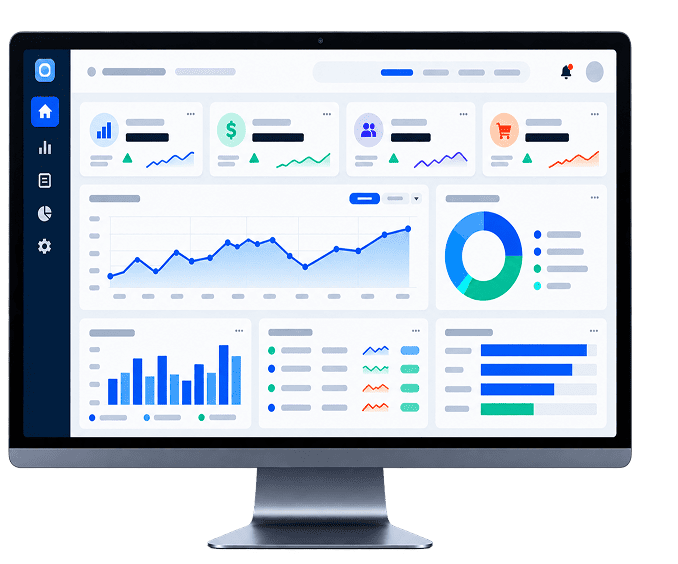
Business Intelligence for Small Companies helps monitor and improve KPIs by analyzing data and identifying trends and patterns. Data visualization tools like dashboards and reports make data easy to understand and act upon. Monitoring KPIs such as revenue, customer satisfaction, and production efficiency help organizations identify areas for improvement.
BI services can help organizations improve collaboration and decision-making by providing a single source of truth. Organizations can make data accessible to all relevant stakeholders using tools such as data warehousing. This can lead to better-informed decisions, faster decision-making, and improved alignment across departments.
Organizations can streamline data management and compliance by using BI to keep a centralized database and data warehousing tools for data accuracy, consistency, completeness and meeting regulatory requirements. To protect sensitive data, organizations can also use data security tools like encryption and access controls.
BI services can optimize operations by identifying inefficiencies and bottlenecks in processes by analyzing data from various systems like ERP, CRM, and SCM. This leads to improved production planning, reduced inventory costs, and faster delivery times.
Business Intelligence vs. Business Analytics: What’s the Difference?
Business Intelligence
Business intelligence tells you what’s happening in your business right now and what already happened. Dashboards, reports, and KPI tracking that answer “how did last quarter go” or “which product is selling.”
Business Analytics
Business analytics goes a step further and asks what’s likely to happen next. It uses your historical data to predict trends, forecast demand, or flag risk before it shows up in a report.
Most small businesses need BI first.
You can’t forecast what you can’t see clearly yet. Once your reporting is solid, analytics becomes the next layer, not a replacement for it.
Our BI Services
Business Intelligence Services for Small Business

BI Consulting Services
A scored BI maturity assessment against your current tools and data setup, delivered in two to four weeks, ending in a prioritized tech recommendation instead of a generic slide deck.

Data Integration Services
Your spreadsheets, CRM, accounting, and e-commerce data mapped and connected into one place, so numbers stop requiring manual re-entry between systems.

Data Warehousing Engineering
A warehouse sized for small-business scale and budget, not an enterprise build you’ll never fully use. Covers implementation, migration or optimization of what you already have, and ongoing support.

Data Visualization & Reporting
Dashboards built around how you already make decisions, a weekly sales review, a monthly update to the owner, not a generic out-of-the-box template. Includes custom KPI definitions and ad-hoc reporting when something new comes up.
Most vendors can sell you a BI tool. Fewer stick around to make sure your team actually uses it.
Get a BI Readiness Assessment →
We stay on after launch

AssessIntegrateDashboardsLaunchTrainingTuning
Common Challenges and Solutions
The Reasons Small Business BI Projects Stall
“We can’t afford enterprise BI tools.”
Solution
Most small businesses don’t need enterprise BI. Tools like Looker Studio, Metabase, and Zoho Analytics are built for exactly this scale, and the right consulting partner scopes to your budget, not a Fortune 500 build.
“We don’t have a data team.”
Solution
You don’t need one. Self-service BI tools with drag-and-drop dashboards mean your existing team can run reports without SQL, once the setup is done right the first time.
“Our data is scattered across five different tools.”
Solution
This is exactly what data integration solves. Connect your CRM, accounting, and sales platforms into one source of truth instead of manually reconciling exports every month.
“We tried BI before and nobody used the dashboards.”
Solution
Usually a sign the dashboards were built around what data existed instead of what decisions people needed to make. Fix the second problem and adoption follows.
The Tools We Work With
Top 10 BI Tools for Small Business
We work across every major BI platform. Here’s how the top ten actually compare, so you can see what fits before you commit to one.

Microsoft Power BI
Best for teams already on Microsoft 365
Integrates natively with Excel, Teams, and the rest of the Microsoft stack. Familiar interface if your team already uses Office, and connects with Power Automate for workflow automation.

Zoho Analytics
Best for ease of use across many data sources
AI assistant Zia automates data prep and supports natural language querying, so non-technical teams can ask questions in plain English instead of writing formulas.

Looker Studio
Best for teams that want a free starting point
Google’s cloud-based tool trades some depth for accessibility. Good for ad-hoc exploration without a steep learning curve or a budget line.

Metabase
Best for a first BI tool with no SQL required
The most beginner-friendly option on this list. Straightforward interface, no-SQL approach, ideal if this is the business’s first real BI implementation.

Tableau
Best for data visualization and team collaboration
Strong prebuilt connectors and the deepest visualization capability here, though it takes more ramp-up time than Metabase or Looker Studio.

Klipfolio
Best for fast dashboard deployment
Built specifically for interactive KPI tracking, with direct integrations into QuickBooks and Google Analytics that most small businesses already run.

Sisense
Best for embedding analytics into your own product
AI-enhanced analytics with the option to build embedded analytic apps, useful if you eventually want to surface data inside your own customer-facing tools.

Teamwork.com
Best if project and resource data matter as much as sales data
Combines project management with BI, useful for service businesses that need visibility into billable hours and resource utilization alongside financial metrics.

Domo
Best for a large library of prebuilt data connectors
Extensive connector library and Magic ETL for data prep without SQL, though it carries more of a learning curve than tools built specifically for beginners.

OracleBI
Best for small businesses planning to scale fast
Part of Oracle Analytics, more robust than most small businesses need on day one, worth considering if rapid growth to a larger operation is the near-term plan.
Picking the tool is the easy part. Here’s what it looks like when the harder part, making it work for your business, goes right:
From the Field
What Nalashaa’s BI Work has Delivered
Centralized KPI Tracking and Leadership Reporting with Power BI
A client needed leadership visibility into performance metrics without a manual reporting burden every month. Nalashaa built centralized dashboards combining SharePoint and Power BI. Result: manual reporting effort cut by 70 to 80%.
Read the full case study →
Enhancing Sales Cadence and Dashboards for a US Travel Management Company
A travel management company needed better visibility into its sales pipeline and cadence. Nalashaa Digital combined Salesforce and Power BI to build the dashboards. Result: a 20% increase in sales, driven by the combined Salesforce and Power BI solution.
Read the full case study →Is any of the above instances familiar to you or have any other requirement?
We are here to help.
Talk to a BI Specialist →less manual reporting effort
Power BI + SharePointincrease in sales
Salesforce + Power BI
Your requirement
Familiar, or something new
Why Nalashaa
Why Small Businesses Work With us on BI

We Stay On After Launch
The most consistently cited differentiator among BI consulting firms isn’t the initial build, it’s what happens after. A dashboard nobody trains your team on becomes shelfware within a month. We provide training and tuning as your data and questions change, not just a handoff.

Scoped to Your Size
We size the engagement, and the tool recommendation, to what a small business actually needs. No enterprise-grade build you’ll grow into eventually, no license fees for capacity you’ll never use.

Tool-Agnostic Advice
We work across Power BI, Zoho, Tableau, Looker Studio, and the rest of the field in Section 6. The recommendation is based on your stack and budget, not which tool we’d prefer to implement.
years of experience
cut in manual reporting effort
sales increase and more numbers to rely on

Ready to See Your Own Data Clearly?
If any of this sounds like where your business is right now, let’s talk about what a working BI setup would actually look like for you.
 732-602-2560
 info@nalashaa.com
Frequently Asked Questions
A scored BI maturity assessment against your current tools and data setup is delivered in two to four weeks and ends in a prioritized tech recommendation. Dashboard build time then depends on how many systems need to be connected.
You don’t need one. Self-service BI tools with drag-and-drop dashboards mean your existing team can run reports without SQL, once the setup is done right the first time.
We work across Power BI, Zoho Analytics, Looker Studio, Metabase, Tableau, Klipfolio, Sisense, Teamwork.com, Domo, and OracleBI. The recommendation is based on your stack and budget, not which tool we’d prefer to implement.
Most vendors can sell you a BI tool. Fewer stick around to make sure your team actually uses it. Consulting covers assessment, integration, dashboards, launch, training, and tuning after go-live.
No. We are tool-agnostic and work across Power BI, Zoho, Tableau, Looker Studio, and the rest of the field. The recommendation is based on your stack and budget.
Business intelligence solutions can be advantageous to a diverse array of industries. Healthcare can oversee patient outcomes and resource allocation. Finance can use BI for risk management, fraud detection, and forecasting. Manufacturing can track supply chain performance and production. Retail can manage inventory, predict sales trends, and segment customers. Government, education, transportation, and telecommunications benefit as well.