I recently found a few Reddit threads where IBM i developers were having unusually honest conversations about AI in legacy environments. Not marketing posts, not vendor hype, just practitioners comparing notes, sharing early experiments, and questioning whether AI is finally useful for AS/400 and RPG systems.
What stood out was how the narrative shifted. These threads weren’t about replacing IBM i or rewriting decades of RPG overnight. Instead, developers were discussing tools like watsonx Code Assistant, ARCAD Discover, and even the idea of combining graph databases with LLMs to better understand legacy code flows.
AS400 is vintage, but modernization is inevitable. The real question surfacing across these discussions is how fast modernization can happen without breaking what already works. For many teams, speed without safety is a risk they cannot afford. That’s where AI is starting to matter not as a silver bullet, but as a supporting layer that helps teams modernize incrementally, preserve institutional knowledge, and make better decisions with confidence.
Why AI for AS/400 Matters Now?
Most organizations are not modernizing AS/400 systems because they are failing. In fact, IBM i environments continue to be among the most stable and trusted platforms in the enterprise. The pressure to modernize is coming from somewhere else entirely.
What has changed is the ecosystem around these systems. IBM’s own strategy reflects this shift. With the launch of watsonx Code Assistant for i in May 2025, IBM has made GenAI-driven RPG analysis and refactoring a central pillar of its modernization roadmap. This signals a clear acknowledgement that the challenge is no longer reliability, but speed, adaptability, and talent sustainability.
Across developer communities and IBM i user groups, the same pattern keeps surfacing. Teams are not struggling to keep systems running. They are struggling to evolve them. Surveys in 2025 show that nearly 73% of IBM i shops now prioritize AI integration and automation, driven by shrinking RPG talent pools, growing integration demands, and pressure to deliver change faster without destabilizing core systems.
Traditional modernization approaches are proving too slow and too risky for this reality. In contrast, AI-driven modernization programs are showing measurable results, with reported productivity gains of around 20% and total cost of ownership reductions of up to 35%, particularly when AI-assisted code transformation is combined with UI modernization, database optimization, and selective cloud or hybrid rehosting.
How AI is reshaping enterprise application development isn’t about speed alone. It’s about where teams are actually seeing faster ROI and where they aren’t. Read the piece to understand what’s changing and why it matters now.
Where AI Can Be Applied in AS/400 Environments
AI works best when applied selectively and incrementally. Below are the most practical, proven areas.
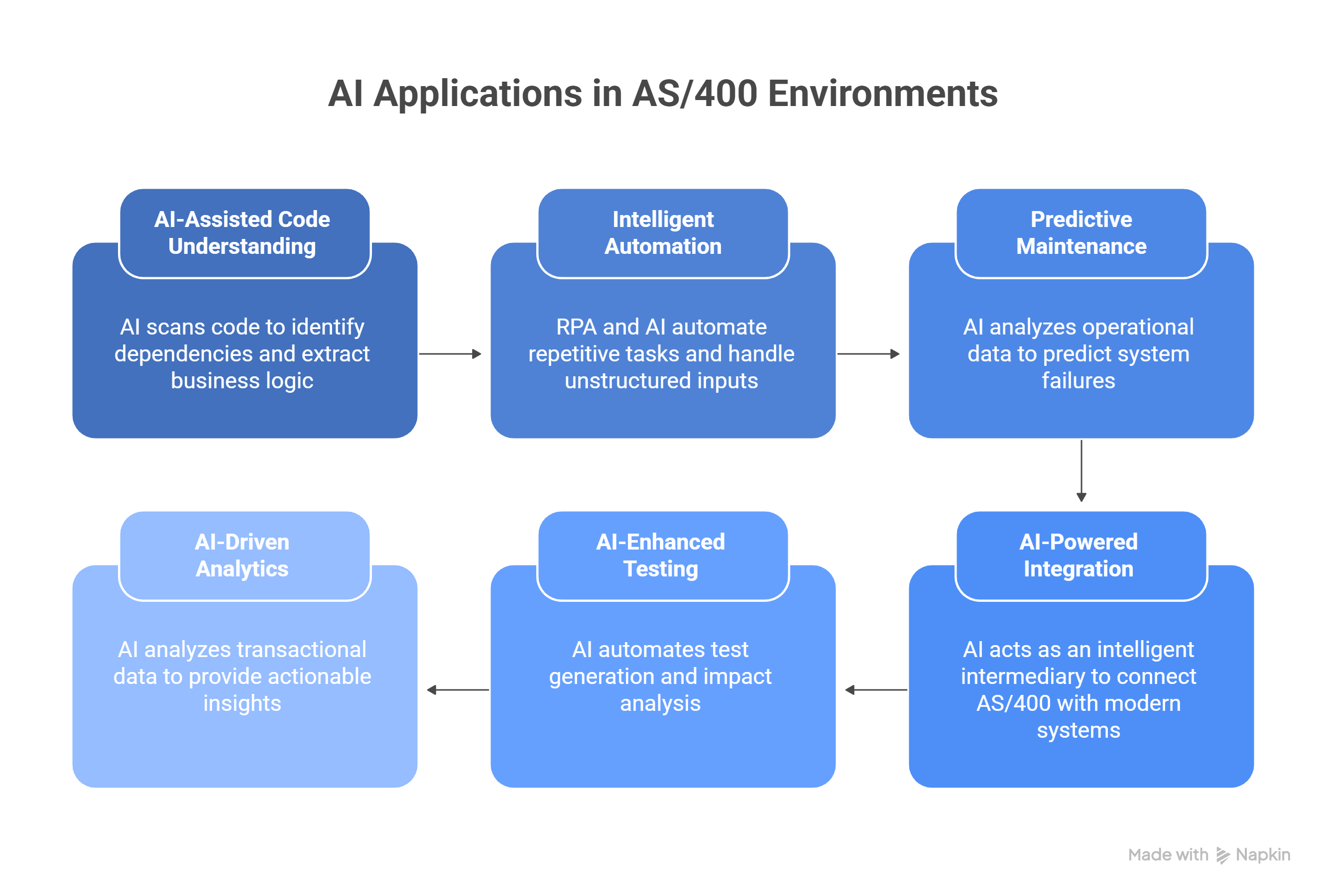
1. AI-Assisted Code Understanding and Documentation
Large AS/400 environments often contain hundreds of thousands of lines of RPG and COBOL written over decades. Business rules, edge cases, and dependencies are embedded directly in code, with little or no documentation. As senior RPG developers retire, this knowledge becomes increasingly difficult to recover.
AI is applied during the analysis stage, before any code is changed.
AI scans complete libraries and programs to identify:
Program-to-program dependencies
Data flows across DB2 files
End-to-end workflows such as order-to-cash, pricing, invoicing, and fulfillment
From this analysis, AI extracts business logic and converts it into plain, readable language. Examples include:
If order value exceeds $10,000, manager approval is required
Freight is calculated based on ZIP code zones and weight brackets
Credit checks are bypassed for contract customers
Individual programs and subroutines are summarized so teams can understand what the code does and why it exists, not just how it is written. This is especially valuable when documentation never existed or is outdated.
AI also generates:
Application architecture diagrams
Call graphs across RPG programs
Data dependency maps
Risk areas where changes are most likely to impact downstream processes
2. Intelligent Automation Using RPA and AI
Many AS/400 environments still rely on people manually navigating green screens, retyping the same information across systems, exporting reports into spreadsheets, and handling routine operational tasks by hand. These processes are usually stable and well understood, but they are also repetitive, high volume, and time consuming. Over time, this manual effort becomes a hidden operational cost that slows teams down and increases the risk of errors.
Automation is applied at the process layer, without replacing or rewriting the AS/400 system itself.
RPA is responsible for interacting with the system exactly as a human would. It handles screen navigation, keystrokes, data extraction from 5250 sessions, and rule-based actions. AI complements this by handling inputs and situations that are not perfectly structured, such as documents, free-text communication, and operational exceptions.
Together, RPA and AI allow AS/400 to operate as part of a modern digital workflow rather than acting as a bottleneck.
Where RPA Delivers the Most Value on AS/400
The strongest automation candidates are processes that are predictable, repeatable, and executed at scale. These use cases consistently deliver fast and measurable returns.
Order Processing and Fulfillment
Automation bots log into AS/400, extract order details directly from green screens, validate inventory availability, update downstream systems such as ERP or CRM platforms, and trigger follow-on actions like shipping updates or customer notifications. What previously required coordination across multiple teams over several hours can be completed in minutes.
Invoicing and Reconciliation
RPA extracts accounts receivable data, generates invoices, and distributes them automatically. When combined with AI, incoming invoices and purchase orders are read using OCR, matched against system records, routed for approval, and tracked with a complete audit trail. This is often an early automation focus because transaction volumes are high and business rules are stable.
Report Extraction and Validation
Instead of staff manually running reports, exporting files, validating totals, and emailing results, bots schedule report runs, extract the data, perform validation checks, and distribute outputs automatically. Once configured, these processes run unattended and consistently.
Data Synchronization Between AS/400 and Modern Systems
RPA bridges AS/400 with cloud platforms such as CRM or ERP systems by synchronizing data directly from green screens into modern applications. This removes double entry, reduces latency, and ensures consistent data across systems without modifying the core AS/400 environment.
What AI Adds Beyond Basic RPA
Traditional RPA is rule driven and deterministic. AI extends automation into areas where inputs vary and exceptions are common.
Document Understanding with OCR
AI accurately reads scanned invoices, PDFs, and email attachments that would otherwise require manual review or brittle rule-based extraction.
Natural Language Processing for Free-Text Inputs
Emails, notes, and unstructured requests are interpreted so tasks can be routed correctly without manual sorting or triage.
Intelligent Exception Handling
Instead of stopping automation when data is missing or inconsistent, AI resolves common issues automatically and escalates only genuine exceptions that require human intervention.
Predictive Signals and Early Warnings
AI identifies recurring patterns such as delays, mismatches, or processing failures and flags them early, helping teams address issues before they affect operations or customers.
3. Predictive Maintenance and Operational Intelligence
AS/400 systems generate a continuous stream of operational data as part of normal system activity. Job logs, runtimes, CPU and memory usage, disk I O, subsystem behavior, and QSYSOPR messages accumulate quietly year after year. This data is time stamped, consistent, and highly reliable, which makes it well suited for predictive analysis.
In most environments, the problem is not a lack of data. The problem is that this data is used only for reactive troubleshooting after an issue has already occurred. Outages, slowdowns, and failed jobs are investigated once users feel the impact, rather than being anticipated in advance.
AI is applied to historical and near real time operational data without changing system behavior. The goal is to detect patterns, trends, and early warning signals that are difficult to spot through manual monitoring.
During analysis, AI examines:
System logs and QSYSOPR messages across long time periods
Job execution history and runtime patterns
CPU, memory, disk, and subsystem utilization trends
Hardware warnings and error sequences
IPL history and past maintenance outcomes
From this analysis, AI identifies risks such as:
Repeated disk I O spikes followed by controller warnings that typically precede hardware failures
Batch jobs whose runtimes suddenly deviate from historical norms due to locks or data growth
Gradual CPU or memory pressure that signals future capacity constraints
Subsystem response degradation that builds up over weeks rather than hours
Maintenance activities that historically correlate with higher failure rates
AI also generates operational artifacts including:
Predictive alerts for hardware and performance risks
Job runtime anomaly reports linked to downstream dependencies
Capacity planning forecasts based on historical usage trends
Maintenance window recommendations with lower operational risk
Operational dashboards highlighting emerging system issues
4. AI-Powered Integration with Modern Systems
AS/400 systems were originally designed to work with DB2, flat files, and EDI based data exchanges. Modern platforms, on the other hand, expect REST APIs, JSON payloads, cloud native databases, and near real time data synchronization. Bridging these two worlds using traditional integration approaches is possible, but it is often fragile and expensive to maintain.
In most environments, integrations are built using rigid mappings and hardcoded rules. Any change in data structure, format, or volume requires manual fixes, testing, and redeployment. Over time, this makes integrations one of the highest risk areas in modernization programs.
AI is applied at the integration layer, not by replacing core systems, but by acting as an intelligent intermediary. The goal is to make integrations adaptive, resilient, and easier to evolve as both legacy and modern systems change.
During analysis, AI examines:
DB2 tables, flat files, and record layouts on the AS/400 side
EDI message formats and transaction patterns
Sample data across multiple time periods
Field relationships, dependencies, and business context
Historical integration failures and exception patterns
From this analysis, AI enables capabilities such as:
Smart EDI processing
Validates incoming EDI messages against expected structures and business rules
Detects missing fields, format mismatches, and common rule violations
Auto corrects predictable issues without human intervention
Routes only true exceptions for manual review, reducing operational workload
AI assisted data mapping
Analyzes DB2 files and positional flat files to infer field meanings
Understands relationships between source fields and modern schemas
Generates mappings automatically instead of relying on manual specification
Adjusts mappings over time as data patterns evolve
Schema change adaptation
Detects when fields are renamed, resized, or repositioned on the AS/400
Understands the intent of the change rather than treating it as a breaking event
Updates mappings automatically to keep integrations running
Prevents downtime caused by minor schema changes
Intelligent data quality controls
Validates formats, ranges, and value distributions at the integration layer
Flags anomalies and outliers before data reaches downstream systems
Prevents bad data from entering ERP, CRM, analytics, or cloud platforms
Improves trust in data without adding manual review steps
AI also produces supporting integration artifacts such as:
Adaptive integration mappings with reduced maintenance effort
Exception reports focused on true business issues
Change impact visibility when source or target schemas evolve
Integration health dashboards showing data quality and flow stability
5. AI-Enhanced Testing and Quality Assurance
Testing is one of the largest blockers in AS/400 modernization efforts. Most RPG applications were not built with unit testing in mind, regression testing is largely manual, and impact analysis often depends on tribal knowledge held by a few individuals. As a result, even small code changes carry disproportionate risk and release cycles become unnecessarily long.
AI is applied to testing and quality assurance before and during code changes. The objective is not to replace human judgment, but to automate repetitive work, surface hidden risks, and make IBM i testing compatible with modern delivery practices.
During analysis, AI examines:
RPG and COBOL programs across the application landscape
Program execution paths and conditional logic
Shared routines, service programs, and file access patterns
Historical defects and production incidents where available
Relationships between programs, files, and business workflows
From this analysis, AI enables testing capabilities such as:
Automated regression test generation
Identifies execution paths, business rules, and edge cases within programs
Generates large sets of regression test cases automatically
Covers input validation, error handling, and exception scenarios
Expands test coverage far beyond what manual testing can achieve
Logic inconsistency detection
Scans large codebases to identify duplicated or diverging business rules
Highlights where the same logic is implemented differently across programs
Surfaces potential defects before they reach production
Helps teams align logic across the application landscape
Faster and smarter impact analysis
Identifies exactly which programs, files, and workflows are affected by a change
Produces a focused list of impacted execution paths and test scenarios
Reduces guesswork when deciding what to test
Lowers both testing effort and release risk
CI CD support on IBM i
Integrates AI generated tests into IBM i CI CD pipelines
Executes automated tests on every code change
Enables smaller, more frequent, and safer releases
Supports DevOps practices without destabilizing production systems
AI also produces quality assurance artifacts such as:
Automated regression test suites tied to specific programs
Impact analysis reports for proposed changes
Logic consistency reports across applications
Test coverage visibility for legacy codebases
6. AI-Driven Analytics and Decision Support
AS/400 systems hold decades of high quality transactional data, including orders, inventory, receivables, payables, and production metrics. This data is accurate, complete, and deeply tied to how the business actually operates. The limitation is not the data itself, but how it is accessed. In many environments, this information remains locked inside green screen applications and static reports, making it difficult to use for forward looking decisions.
AI is applied to AS/400 data to move analytics beyond historical reporting. The objective is to turn transactional data into actionable intelligence that supports forecasting, early detection of issues, and self service analysis for business leaders.
During analysis, AI examines:
Historical sales, inventory, and production data stored in DB2
Order, invoice, payment, and supplier transaction patterns
Seasonal trends, demand variability, and lead times
Pricing behavior and margin changes over time
Relationships between operational events and financial outcomes
From this analysis, AI enables analytics capabilities such as:
Demand forecasting and inventory optimization
Analyzes years of sales history and seasonal demand patterns
Accounts for lead times, variability, and historical volatility
Generates data backed demand forecasts
Recommends inventory levels that reduce excess stock while preventing shortages
Transaction anomaly detection
Continuously scans orders, invoices, payments, and supplier activity
Identifies unusual pricing, stalled transactions, or abnormal volumes
Flags deviations early before financial or operational impact occurs
Helps teams intervene proactively instead of reacting to issues after the fact
Natural language analytics for business users
Allows users to ask questions in plain language
Generates instant dashboards, forecasts, and explanations
Reduces reliance on BI teams for everyday analysis
Expands access to insights across finance, operations, and leadership teams
Power BI and AS/400 integration
Connects AI enhanced BI tools directly to AS/400 DB2 data
Surfaces insights through interactive dashboards and visualizations
Uses built in forecasting and anomaly indicators
Provides narrative summaries explaining what changed, why it changed, and what actions to consider
AI also produces decision support artifacts such as:
Forecast models tied directly to transactional data
Early warning indicators for financial and operational risk
Executive dashboards with embedded insights
Self service analytics views for business teams
AI is quietly reshaping every stage of the SDLC, from requirements to release. Read more to see how teams are cutting costs, reducing errors, and delivering faster with AI.
A Practical Roadmap to Apply AI on AS/400
Here’s a practical roadmap that will guide you in your AI adoption journey:
Phase 1: Assess Technical Debt and Data Readiness
Before any AI use case is discussed, your team needs a realistic view of their code and data. In almost every AS/400 environment that we have seen so far, the system actually works well, but the understanding of how it works is incomplete.
So to fix this knowledge gap, the first step is a structured assessment.
This typically involves:
Scanning the most critical libraries to understand dependencies and unused code
Identifying where business rules are embedded in RPG or COBOL logic
Measuring how much of the codebase is fixed format, duplicated, or tightly coupled
Sampling a few years of transactional data to check completeness, consistency, and duplication
In one environment we worked with, the team assumed their order pricing logic was centralized. The assessment showed the same approval rule implemented differently in five programs. That single insight reshaped the entire AI plan.
Phase 2: Identify High-Impact, Low-Risk Use Cases
So now you know the system, the next step is selecting the right starting points. The mistake many teams make is aiming AI at core transaction processing too early.
Instead, experienced teams look for use cases that:
Touch high volumes of work
Are operationally painful today
Do not require rewriting core business logic
Some of the examples include:
Invoice processing
Job runtime monitoring
Code understanding and documentation
Data quality checks at integration points
Phase 3: Start with Pilots, Not Core Systems
So once you’ve picked the use cases, the next step is not to roll them straight into production or touch core workflows.
The next step is to run pilots.
A pilot is simply AI working alongside your existing AS/400 processes, not replacing them. You are letting it observe, process, and suggest while the current system continues to run exactly as it does today.
In practical terms, this usually means:
Running AI on a small slice of real transactions or jobs
Comparing AI outputs with what the system and teams already do
Keeping humans in the loop to validate results
Measuring impact over a few weeks, not over a long project cycle
I’ve seen pilots where teams started with barely 10 to 15 percent of volume. That was enough to answer all the important questions. Does the AI understand the data? Are the outputs usable? Are exceptions being flagged correctly? Is anything breaking downstream?
Once those answers are clear, the conversation shifts. Teams stop debating whether AI will work and start discussing where to expand it next.
Phase 4: Integrate Through APIs and Middleware
The next thing to do is connect it to the rest of the landscape.
This is where AS/400 environments have traditionally struggled. Integrations were built years ago using rigid mappings and tightly coupled batch jobs. Any small change on either side meant something broke and a specialist had to step in.
AI changes how this layer works.
Instead of wiring systems directly to each other, you introduce a middle layer that sits between the AS/400 and modern platforms. The AS/400 keeps doing what it already does well. The intelligence sits outside it.
Phase 5: Adopt DevOps and Automated Testing
Usually, when someone asks why AS/400 changes take so long, the answer comes down to testing.
Most teams still rely on manual regression testing. A change goes in, and then people try to remember which programs, jobs, or files might be affected. Some teams test everything to be safe. Others test very little and hope nothing breaks. Either way, it slows releases down and adds stress.
What helps here is using AI to remove the guessing.
Instead of relying on memory, the system looks at the code and shows exactly what is impacted by a change. It generates tests for those paths and runs them automatically whenever something is updated.
Conclusion
When you step back and look at where the industry is investing today, a clear pattern emerges. Teams are not abandoning stable systems. They are surrounding them with intelligence. AI, automation, DevOps, and analytics are where real effort and impact are happening right now. Your AS/400 systems also need to move in that direction.
And we can help you do that with our experience applying GenAI-driven prototypes, practical accelerators, and automated testing where they actually make a difference. Get in touch with us now so that we can discuss where your journey needs to be headed.