
If you are responsible for the AS/400 that still runs your core business, four problems usually force the migration conversation.
The next Power hardware refresh costs far more than expected. Your most experienced RPG developer retires or leaves. The disaster recovery environment fails an audit or has not been tested in over a year.
Then the business asks for capabilities the current architecture cannot support easily, such as mobile access, real-time data, or AI.
When these issues arrive together, the platform is no longer simply aging. It is becoming a business risk.
The warning signs are already visible across the market.
- IBM increased the price of its four-core Power11 chip by 66 percent in 2026.
- New Jersey struggled to maintain its 40-year-old benefits system during the pandemic because experienced COBOL programmers were difficult to find.
- Delta and British Airways suffered major losses after disaster recovery plans failed during real incidents. Southwest cancelled 16,700 flights during its 2022 holiday disruption after years of delayed modernization.
Most organizations still see only two options. They can keep the existing environment and accept rising costs, talent shortages, and operational risk. Or they can rewrite the entire system and commit to a long, expensive transformation program.
There is a third option.
AS/400 migration to cloud can move the infrastructure to a more flexible, resilient, and consumption-based model without forcing an immediate rewrite of the RPG applications that run the business.
This approach is already gaining ground. Fortra's 2026 IBM i Marketplace Survey found that cloud-only IBM i environments reached a record high and surpassed hybrid environments for the first time. IBM's Power Virtual Server business has also reported eight consecutive quarters of double-digit growth. One North American retailer reportedly saved $450,000 annually by moving IBM i workloads away from aging on-premises hardware.
The question is no longer whether AS/400 cloud migration is possible. The real question is whether the cost, risk, and timing now make it the right move for your environment.
The False Binary
Most AS/400 modernization conversations are framed as a choice between two extremes.
- The first is to keep the platform running as it is, accepting rising hardware costs, a shrinking talent pool, and the operational risk of depending on aging infrastructure.
- The second is to replace it entirely by rewriting decades of RPG and COBOL into a modern stack.
Neither option is inherently wrong, and neither is automatically the right fit for every enterprise running AS/400 today. The right path depends on your needs and where your environment stands right now, and for most enterprises it comes down to one of three clear choices.
Stay on-premise, for now
When the system is stable, still meeting business needs, running on supported hardware, and backed by a team that knows it, staying put can be a legitimate choice. It makes sense when there is no regulatory, cost, or product pressure forcing a move, and when the risk and expense of changing today outweigh the benefit.
The catch is that this is a "not yet," not a "never." It works as a conscious hold with a review date, a way to buy time, but not as a destination. Every quarter you wait, the hardware ages, the talent pool shrinks, and the eventual move gets harder, so this only holds while none of those pressures have arrived yet.
Rewrite or replace, and move off the platform
At the other end, a full rewrite is the right call only under specific conditions: the underlying business process has fundamentally changed, you are deliberately retiring AS/400 in favor of a modern ERP or SaaS solution, a regulatory or product requirement genuinely cannot be met through integration, or the codebase is small and well documented enough to keep the rewrite risk contained.
Where those conditions are truly met, rebuilding is the correct decision, not the reckless one. But for most enterprises they apply to only part of the estate, not all of it, which is why a wholesale rewrite of everything is rarely the right first move.
Migrate to the cloud, and lift the infrastructure first
For most enterprises, the fit sits between the two extremes, and this is where the majority land. When you need to cut hardware costs and reduce the risk of aging infrastructure now, but the application logic is still valuable and too deeply embedded to rewrite safely, the practical route is to move the infrastructure to the cloud first and modernize the applications afterward in smaller, separately funded phases.
This decouples the "get off fragile hardware" timeline from the "modernize the code" timeline, so the business is never forced to do both at once. It ends the on-premise risk immediately, preserves the logic that still runs the business, and turns modernization from a single high-stakes project into a series of manageable steps.
That is why, for the enterprises that do not fit the two extremes, a cloud-ready AS/400 is usually the safest way forward, and it is the path the rest of this guide walks through in detail.
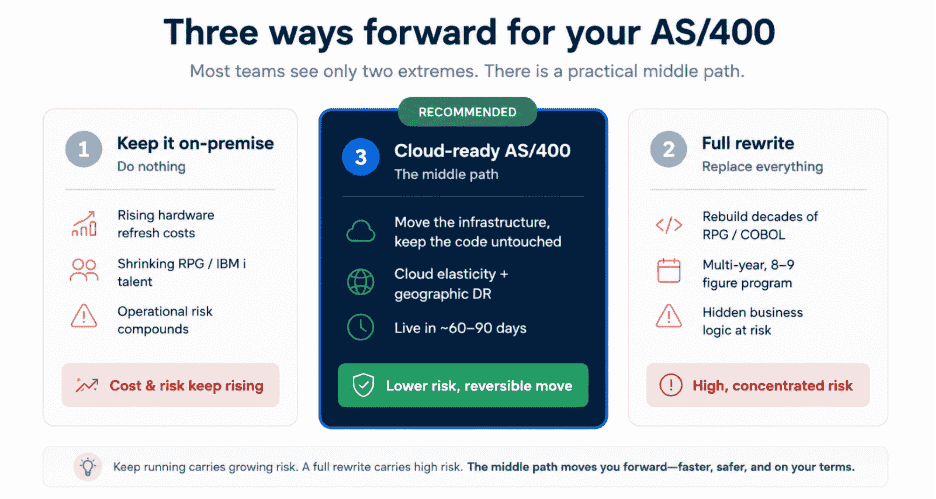
The comparison below shows how the three paths perform across the factors that usually determine the outcome.
| Option 1 Keep Running On Premise |
Option 2 Full Rewrite |
Option 3 Cloud Ready AS/400 |
|
|---|---|---|---|
| Timeline to value | Indefinite. The system runs until something breaks. | 3 to 5 years, often longer. | 60 to 90 days to a running production LPAR. |
| Upfront capital | Hardware refresh every 4 to 5 years, with each cycle costing more than the last. | Eight to nine figures over the life of the program. | None. Consumption billing starts from day one. |
| Code changes required | None | Complete RPG and COBOL rewrite into a modern stack. | None. Binary identical lift from Power hardware to cloud hosted Power. |
| Talent dependency | Senior RPG and IBM i operations staff remain critical, but they are increasingly scarce. The average age is around 51. | Dual capacity is required: legacy maintenance plus modern stack engineering. | A managed services partner absorbs the operations layer. |
| Risk profile | Risk compounds quietly. The failure mode is sudden and forces decisions under pressure. | 9 percent success rate at budgets above $10 million, per the Standish CHAOS 2020 report. | Reversible. The workload remains portable between PowerVS, Skytap, managed providers, and on premise Power. |
| Disaster recovery | A separate budget line that produces no value until something fails. | Replaced as part of the rewrite, but only on the rewrite's timeline. | Geographic replication across cloud regions becomes a configuration option, not a separate infrastructure investment. |
| Elasticity | Sized for peak load, leaving idle capacity through the rest of the year. | Whatever the new stack supports, available only after cutover. | Cores and memory are billed by the hour, with reserved rates available for the baseline. |
| Modernization sequence | Deferred until a forced event. | Bundled into a single high risk program. | Sequenced as separate, lower risk projects after the migration is stable. |
Every quarter on aging IBM i hardware adds cost and risk
Plan your move to cloud-hosted Power
What "Without Rewriting Code" Actually Means
AS/400 applications run on IBM Power architecture. Moving them to the cloud means running the same operating system and applications on cloud-hosted Power infrastructure instead of hardware in your own data center.
The code keeps running as it is. The main change is where the infrastructure is hosted and who manages it.
From there, modernization can follow four stages:
Rehost → Replatform → API-led integration → Selective refactoring
The sequence matters. You begin with the least disruptive option and move further only when the business case justifies it. Many enterprises gain most of the value from the first two stages.
1. Rehost: Change the Infrastructure, Not the Application
Your existing AS/400 environment is copied to cloud-hosted Power infrastructure and switched over with minimal application change.
What stays the same
- 5250 screens continue to work as they do today.
- Reports arrive in the same format and on the same schedule.
- Existing applications and batch processes continue running.
- Downstream systems continue connecting to the same business logic.
What you get
- No more hardware refresh cycle
- Flexible capacity
- Consumption-based infrastructure costs
- Stronger disaster recovery options
- Less dependence on aging on-premises equipment
No RPG or COBOL rewrite is required.
2. Replatform: Clean Up the Environment During the Move
The migration window is also a good time to address technical housekeeping that may have been delayed for years.
What changes
- Upgrade IBM i to a supported release
- Review DB2 indexes and access paths
- Improve journaling and recovery settings
- Rationalize BRMS backup policies
- Remove inactive user profiles and stale permissions
- Clean up orphaned objects and unused components
What stays the same
The application binaries and business logic remain unchanged.
The result is the same application running in a cleaner, supported, and better-tuned environment.
3. API-Led Integration: Connect Existing Logic to Modern Systems
This is where many teams assume a rewrite becomes necessary. It often does not.
IBM Integrated Web Services can expose existing RPG or COBOL programs as REST or SOAP services. Modern applications can then call those programs through standard APIs.
What this enables
- Mobile applications
- Customer and supplier portals
- Partner integrations
- API gateways
- Analytics platforms
- Cloud applications
The calling application receives JSON or XML and does not need to know that the underlying logic is written in RPG or COBOL.
What you get
Existing business functions such as pricing, credit checks, inventory lookup, and policy calculations can be reused by modern systems without rebuilding them.
You can also modernize development practices around the code through tools such as Git, automated testing, modern IDEs, DevOps pipelines, and impact analysis.
4. Selective Refactoring: Rewrite Only What Justifies It
After the infrastructure and integration layers are stable, some modules may still justify replacement or refactoring.
These are usually:
- Customer-facing components
- Integrations with retired or unsupported systems
- Modules built around outdated business processes
- Areas where the current logic no longer meets business needs
Each module can then be treated as a separate project with a clear scope, budget, and success measure.
What stays untouched
The rest of the codebase can remain in production if it is reliable, accurate, and still supports the business.
Age alone is not a reason to rewrite working software. The better approach is to preserve what still works and modernize only where the value is clear.
Move your AS/400 to the cloud without rewriting it
Talk to Nalashaa's IBM i team about a low-risk move to cloud-hosted Power
Where the Workload Actually Runs
The previous section explained how an IBM i workload can move to the cloud without changing its application binaries because the Power architecture remains intact.
The next question is where that workload should run.
There is no single answer. Cloud-hosted IBM i generally falls into three established models, and the right choice depends on how much control, integration, and operational responsibility the organization wants to retain. In all three models, the workload can move without a rewrite.
1. IBM Power Virtual Server
IBM Power Virtual Server is IBM's own infrastructure-as-a-service platform for Power workloads.
It supports IBM i environments on cloud-hosted Power infrastructure and allows organizations to scale cores, memory, and storage without rebuilding the application. Capacity can be consumed on demand or reserved for more predictable pricing.
This option is best suited to organizations that want close alignment with IBM's roadmap, tooling, and support model.
2. Skytap on Azure
Skytap on Azure places IBM Power workloads inside the broader Microsoft Azure environment.
This can make it easier to connect IBM i with services such as Power BI, Azure Synapse, Azure Kubernetes Service, analytics platforms, and AI workloads. It can also reduce the latency and integration effort involved when the rest of the cloud estate already runs on Azure.
The service is available through the Azure Marketplace, which can help organizations use existing Azure commitments and procurement processes.
3. Managed IBM i Cloud Providers
Managed IBM i providers combine cloud-hosted Power infrastructure with day-to-day operations, monitoring, backup, and disaster recovery.
This model allows the organization to move away from running the data center and managing the infrastructure internally, while still retaining control over the workload and application environment.
Depending on the provider, the environment may be dedicated or shared, with support and recovery services included in a single engagement.
Choosing the Right Model
The decision comes down to operating preference.
IBM Power Virtual Server offers the closest alignment with IBM. Skytap on Azure is a strong fit when the wider cloud estate is already on Microsoft Azure. Managed providers are better suited to organizations that want to hand off infrastructure operations entirely.
The workload can remain the same in each case. What changes is who operates it, how it connects to the rest of the technology estate, and how much control the internal team wants to keep.
Is Your Environment in the Decision Window?
The question is no longer whether a Cloud-Ready AS/400 is technically achievable, or whether the financial argument holds in principle. Both are now settled. The relevant question is whether the conditions in a given organization make the move urgent or merely advisable.
A short qualifying check separates the two. The decision window has opened if any of the following are true.
- The next Power hardware refresh quote is within eighteen months of signature.
- A senior RPG developer or IBM i system administrator on the team is within five years of retirement, with no identified successor.
- The disaster recovery environment has not been failed over to in the last twelve months, or the most recent failover surfaced material issues.
- A compliance audit in the last cycle flagged business continuity, patch currency, or access controls as concerns.
- The business is asking for analytics, mobile, or AI capabilities that the current architecture cannot deliver without significant integration work that has nowhere to land.
Two or more of these conditions in the same environment indicate that the cost of waiting is now compounding faster than the cost of moving. The platform is no longer running on inertia. It is running on borrowed time, and the timeline by which the move happens is now more likely to be set by a forced event than by the organization's own planning cycle.
What the First 90 Days Look Like
A successful AS/400 cloud migration usually follows four stages.
Days 1 to 30: Assess
The first month is about understanding the environment before anything moves.
The assessment covers the IBM i operating system, licenses, applications, integrations, user profiles, storage, backup processes, and infrastructure dependencies. This stage often reveals dormant accounts, unused tools, excess capacity, and licensing costs that can be removed before migration.
By the end of the assessment, you should have:
- A migration feasibility score
- A complete dependency map
- A target cloud architecture
- An initial cost and licensing model
- A list of risks that must be addressed before cutover
Days 31 to 60: Pilot
The next stage moves a non-production copy of the environment to cloud-hosted Power.
The pilot is tested under realistic load to confirm application performance, integration behavior, storage requirements, backups, security controls, and monitoring. This is also where the team rehearses the migration and validates the cutover sequence.
By the end of the pilot, you should have a working cloud environment and a tested cutover plan.
Days 61 to 90: Cut Over
During the final stage, live replication keeps the cloud environment closely synchronized with production.
The actual switch can usually be completed during a planned weekend or overnight window. Because the application and operating environment remain on IBM i and Power architecture, validation is much faster than it would be during a rewrite.
The team confirms that applications, interfaces, batch jobs, printing, user access, backups, and monitoring are functioning correctly before production is fully handed over.
After Cutover: Optimize
Once the workload is stable, the focus shifts from migration to improvement.
Teams can right-size capacity, automate disaster recovery tests, strengthen monitoring, expose selected business functions through APIs, and connect IBM i data with cloud analytics and AI services.
The most common problems are predictable: missed desktop dependencies, licensing gaps, underestimated storage, incomplete cleanup, and undocumented interfaces. A detailed assessment catches these issues before they become delays or unexpected costs.
The Objections You Will Hear and How to Answer Them
The technical question is rarely whether IBM i can run in the cloud. Most concerns come from finance, procurement, compliance, or risk teams.
"It will cost more over five years."
That comparison often looks only at the server purchase. A fair calculation must also include refresh cycles, maintenance, power, cooling, floor space, disaster recovery, licensing, and operations staff.
Cloud pricing should also reflect reserved capacity for steady demand and consumption pricing for peaks. The real comparison is total cost over the same period.
"The downtime will be unacceptable."
Modern replication can keep the cloud environment only seconds behind production, allowing cutover during a planned overnight or weekend window.
Because the workload remains on IBM i, validation is much faster than with a rewrite. A controlled cutover is also less risky than an unplanned hardware failure.
"We will be locked into one provider."
A Power-to-Power move keeps the workload on IBM i. It can move between IBM Power Virtual Server, Skytap, managed providers, or back on premises.
Provider choice still matters, but the workload remains more portable than it would after a proprietary cloud rewrite.
"Auditors and regulators will not accept it."
Cloud-hosted Power supports established security and compliance frameworks.
The key is designing the right controls for identity, access, encryption, logging, backup, recovery, and evidence collection. Audit and compliance teams should be involved from the assessment stage, not just before cutover.
A Defined-Scope Next Step
The next step does not need to be a migration commitment. It should be a clear assessment of where your IBM i environment stands today, what risks are already visible, and which cloud-ready path would make sense without disrupting the business.
In 30 minutes, we can help you identify whether your current setup is fit to stay as it is, ready for a cloud-hosted Power environment, or in need of a phased modernization plan.
If IBM i is still critical to your operations, this is a conversation worth having before the next hardware cycle, audit finding, or staffing gap forces the decision for you. Get in touch with us today.
Frequently Asked Questions
1. What is the difference between AS/400 cloud migration and AS/400 modernization?
Cloud migration moves the existing IBM i workload to cloud-hosted Power without changing the application. It's an infrastructure shift. Modernization changes the application itself: exposing RPG as APIs, adding interfaces, or refactoring logic. Migration can happen first with no code changes; modernization is then sequenced afterward as separate, lower-risk projects.
2. How much does an AS/400 cloud migration cost?
There is no fixed price. AS/400 cloud migration runs on a consumption model rather than a capital purchase, so cost depends on the cores, memory, and storage tiers your workload consumes. The main drivers are LPAR size, how much of the load is steady-state (cheaper on reserved capacity) versus peak (billed hourly), DR requirements, and third-party software licensing. Most environments start billing from day one with no upfront hardware outlay.
3. What is the best cloud platform for AS/400 (IBM i)?
There is no single best. The right choice depends on where the rest of your architecture sits. IBM Power Virtual Server suits teams wanting the closest alignment with IBM's roadmap; Skytap (Kyndryl Cloud Uplift) suits those whose analytics and AI estate already runs in Azure; managed IBM i providers suit teams wanting to exit data-centre operations entirely. All three run the same unmodified IBM i workload.
4. How is AS/400 data migrated to the cloud?
AS/400 data is migrated using block-level replication, which copies the IBM i environment to the cloud target and keeps it synchronized to within seconds of production. Tools such as IBM PowerHA SystemMirror for i, Precisely Assure MIMIX, and Maxava HA handle this, so the final cutover is fast and data loss is near zero — the workload is binary-identical to the source.
5. Does moving an AS/400 to the cloud improve performance?
Performance is comparable, because the workload runs on the same IBM Power architecture in the cloud as on-premise. The gain is not raw speed but elasticity: cores and memory can scale up for peak windows and release afterward, and right-sizing often improves responsiveness for workloads that were previously starved or oversized on fixed hardware.
6. Can an AS/400 connect to AI and analytics tools after a cloud migration?
Yes. Once on cloud-hosted Power, IBM i data and logic integrate with modern AI and analytics platforms — RPG programs can be exposed as REST endpoints via Integrated Web Services, and DB2 for i data can feed tools like Azure Synapse, BigQuery, or Snowflake. No rewrite is required to make the existing application consumable by AI pipelines.