
On September 30, 2026, IBM i 7.4 exits Standard Support
Yes, permanently....
So there won't be new security patches, defect fixes, or PTFs. If a zero-day vulnerability surfaces on October 1st, IBM's answer is going to be silence.
IBM didn't bury the headline either. IBM i 7.4 was withdrawn from marketing on April 30, 2026, making it the first signal in a two-step wind-down that is now fully in motion.
What comes after September 2026 is a paid Service Extension, which means a lifeline IBM offers through September 30, 2029, but at a cost premium, with limited scope, and with one unambiguous message attached: you are running on borrowed time, and you are paying for the privilege.
For organizations still on 7.4, the math I am going to break down is going to be a little uncomfortable.
The Cost of Waiting
The longer you wait, the more expensive and risky the upgrade becomes. Here is exactly why.
The Countdown Is Already Tight
With roughly 150 days left until the September 30, 2026 EOS deadline, the window to plan an IBM i upgrade is not as wide as it looks. A properly planned IBM i upgrade covering assessment, testing, change management, and cutover takes a minimum of 90 to 180 days for most mid-size shops. Organizations that have not started planning are already inside that window.
The Service Extension Trap
What comes after September 2026 is a paid Service Extension, a lifeline IBM offers through September 30, 2029. Three years of continued access, but at a cost premium, with limited scope, and with one unambiguous message attached: you are running on borrowed time, and you are paying for the privilege.
Here is the math. IBM SE pricing runs at a meaningful premium over standard support rates. If your annual support contract runs at a baseline figure, you are likely paying that baseline plus a premium multiplier for three years. At the end of those three years, you still have to upgrade. You will have spent the premium, accumulated the risk, and arrived at the same destination, just later and more expensively.
SE does not restore security patches for new vulnerabilities. It does not bring new functions. It does not change the fact that 7.4 is a release IBM no longer believes in. It simply extends the time you can stay on it, at a price.
For the detailed SE cost breakdown and multiplier ranges, see our earlier post:
The CVE Accumulation Problem
After September 30, 2026, every CVE disclosed that touches IBM i will receive a patch for 7.5 and 7.6 users. For 7.4 users on standard support: nothing.
CVEs don't pause while you plan. They compound. By the time a 7.4 shop on SE finally upgrades in, say, 2028, they will have accumulated two-plus years of unpatched exposure, a growing attack surface with a documented, public vulnerability list that any threat actor can read.
You can reinforce this with IBM's own PTF (Program Temporary Fix) cadence data. 7.5 has been receiving security PTFs consistently. Pull the numbers from IBM's fix central and count them.
The Cyber Insurance Problem
This one is increasingly real and under-discussed. Cyber insurers are tightening questionnaires. Several major underwriters now specifically ask:
- Is your OS under active vendor support?
- Do you receive regular security patches?
A "no" on either question after September 30, 2026, can mean:
- Higher premiums (unsupported infrastructure = elevated risk profile)
- Reduced coverage limits
- Claim denial if a breach is linked to an unpatched vulnerability on an unsupported release
The Skills Gap Is Already Closing
The September 30 deadline is fixed. The availability of people to help you meet it is not. IBM i talent is already a supply-constrained market. The pool of administrators, developers, and consultants who specialize in IBM i upgrades is finite, and every shop reading this blog is competing for that same capacity.
Demand for upgrade services is spiking right now, in Q2 2026, as deadline pressure forces action across thousands of shops simultaneously. Consulting rates are going up. Availability is going down. Timelines are stretching.
Organizations that started their upgrade in Q4 2025 or early Q1 2026 locked in capacity and market rates. That window is closed.
Today, in Q2 2026, you are already in the crowded lane. Organizations that wait until Q3 will be at the back of a very long queue, paying a premium for consultants who are already double-booked, if they can secure anyone at all before the September 30 deadline.
So, what does this indicate:
You're not just managing technical debt, you're accumulating compliance exposure, cyber-insurance risk, and audit liability with every quarter you delay. Regulators and underwriters are increasingly asking the same question you will eventually have to answer: why are you running unsupported infrastructure on your most critical workloads?
A grounded look at how real-world AS400 environments evolve over time, where risks build quietly, and how organizations stabilize operations before modernizing.
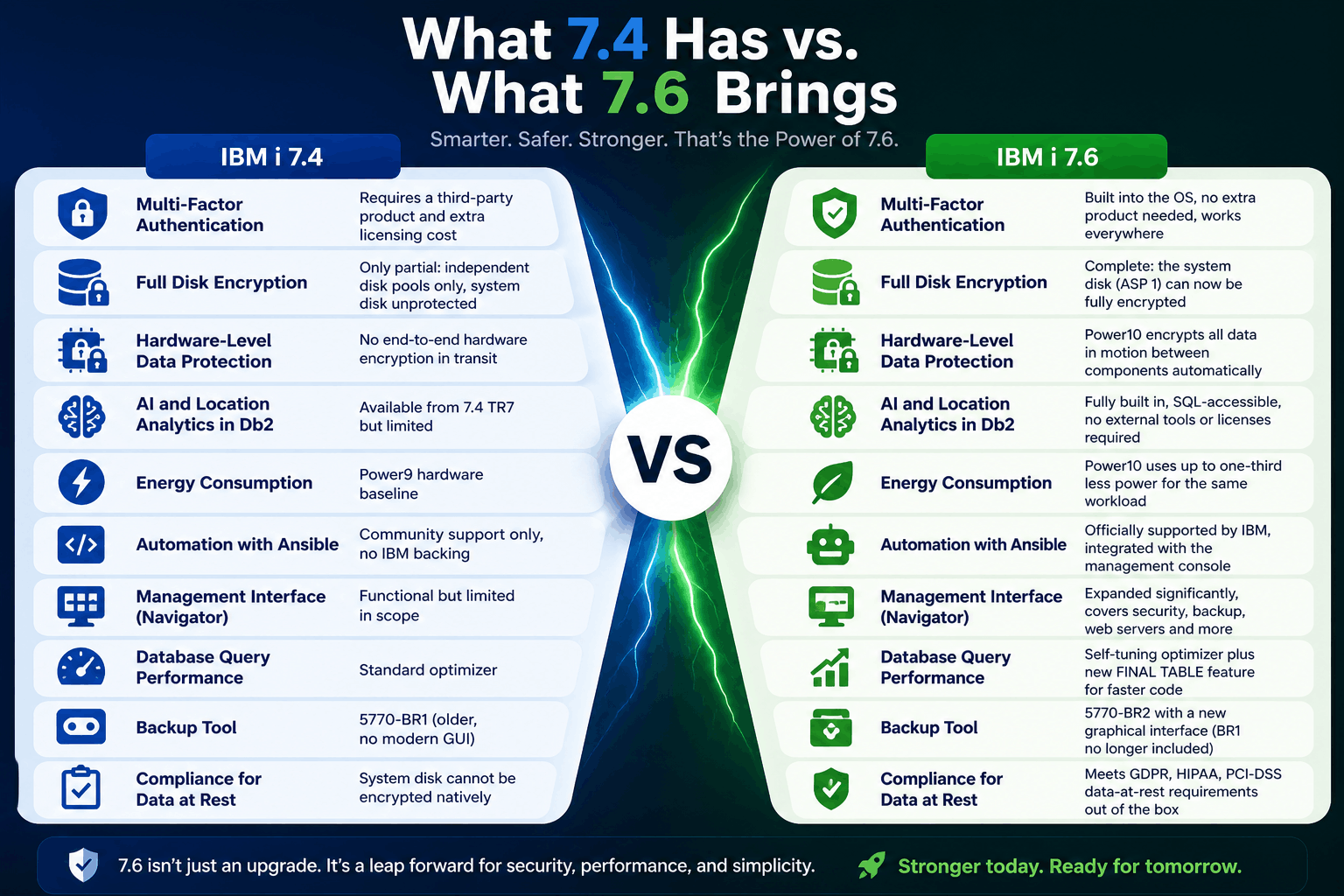
What 7.4 Has vs. What 7.6 Brings
| Feature | IBM i 7.4 | IBM i 7.6 |
|---|---|---|
| Multi-Factor Authentication | Requires a third-party product and extra licensing cost | Built into the OS, no extra product needed, works everywhere |
| Full Disk Encryption | Only partial: independent disk pools only, system disk unprotected | Complete: the system disk (ASP 1) can now be fully encrypted |
| Hardware-Level Data Protection | No end-to-end hardware encryption in transit | Power10 encrypts all data in motion between components automatically |
| AI and Location Analytics in Db2 | Available from 7.4 TR7 but limited | Fully built in, SQL-accessible, no external tools or licenses required |
| Energy Consumption | Power9 hardware baseline | Power10 uses up to one-third less power for the same workload |
| Automation with Ansible | Community support only, no IBM backing | Officially supported by IBM, integrated with the management console |
| Management Interface (Navigator) | Functional but limited in scope | Expanded significantly, covers security, backup, web servers and more |
| Database Query Performance | Standard optimizer | Self-tuning optimizer plus new FINAL TABLE feature for faster code |
| Backup Tool | 5770-BR1 (older, no modern GUI) | 5770-BR2 with a new graphical interface (BR1 no longer included) |
| Compliance for Data at Rest | System disk cannot be encrypted natively | Meets GDPR, HIPAA, PCI-DSS data-at-rest requirements out of the box |
Security: The Biggest Reason to Upgrade
The security improvements in 7.6 are not incremental. They are the kind of changes that close vulnerabilities that organizations have been working around for years with costly add-ons.
Multi-Factor Authentication Built Right In
Multi-Factor Authentication (MFA) means that logging into a system requires two things: your password plus a second code from your phone. Even if a hacker steals someone's password, they cannot get in without that second factor.
On IBM i 7.4, getting MFA required buying and configuring a separate product. It was complicated and expensive. On IBM i 7.6, MFA is part of the operating system. Administrators turn it on from the management console. It works for every way users connect to the system including green screen sessions, database connections, file transfers, and developer tools.
- Phishing attacks and stolen passwords are the leading cause of data breaches. MFA stops most of them.
- Many cyber insurance policies now require MFA. Having it built in removes a compliance headache.
- No more paying for a third-party MFA product. The saving is immediate.
- MFA in 7.6 also covers the system's own administrative tools (Service Tools), closing a gap that existed in earlier releases.
- Third-party security vendors can still plug in through the new authentication exit point if you have an existing investment to protect.
Your Entire Disk is Now Protected
If someone physically steals a server's disk drives, or if data leaks out of a shared storage environment, encryption is what keeps your business records unreadable to anyone who should not have them.
IBM i 7.4 could encrypt some disk pools, but not the main system disk (called ASP 1). That meant the most important data on the system sat unencrypted. IBM i 7.6 fixes this. You can now encrypt everything, including the system disk, using tools already built into the operating system.
This matters especially to organizations using IBM cloud infrastructure (Power Virtual Server), where physical media handling is outside your direct control. It also matters for meeting audit requirements under GDPR, HIPAA, and PCI-DSS, all of which require data at rest to be encrypted.
Protection Against Hardware Tampering
A supply chain attack happens when someone modifies server hardware after it leaves the factory, adding a tiny monitoring device designed to steal data. This is not a theoretical risk. It is a documented threat taken seriously by national security agencies.
IBM Power10 processors include end-to-end hardware encryption that means all data moving between components inside the server is encrypted. Even if a device were added to intercept that data, it would see only scrambled content. Because IBM i 7.6 runs only on Power10, every 7.6 customer gets this protection by default.
Other Security Improvements Worth Noting
- Stronger default Kerberos encryption. The outdated algorithms that older single sign-on configurations used are no longer created by default. New connections use AES-256, which is the current standard.
- TLS-only host server connections. Administrators can now force all connections to IBM i services to use encrypted channels. A wizard in the management console walks through the setup step by step.
- Better audit reporting through SQL. Security teams can now query the audit log directly using standard SQL queries, making it much easier to produce compliance reports without specialist IBM i knowledge.
- Stronger impersonation controls. It is harder for one user profile to act as another without explicit permission, reducing the damage a compromised account can do.
AI and Analytics: Smarter Decisions Without Moving Your Data
IBM i 7.6 lets your team run location-aware analytics directly against your business data without extracting it, licensing new tools, or setting up a separate analytics environment.
One of the most expensive and risky parts of analytics projects is moving data out of the system it lives in. Every time data moves, it creates security exposure, compliance questions, and operational complexity.
IBM i 7.6 builds geospatial analytics directly into Db2 for i, the database that already holds your business data. Your developers and analysts can answer location-based questions using standard SQL. No additional products. No data pipelines. No extra licensing.
- Find the nearest service engineer, warehouse, or store to a customer location using a SQL query
- Optimize delivery routes by calculating distances between stops directly from order data
- Assess risk exposure by identifying how many facilities or customers fall within a specific geographic area
- Analyze whether historical weather patterns near a site pose a risk to operations or insurance obligations
- Track real-time positions of vehicles, containers, or assets without a separate tracking system
IBM has also announced that future Watson-powered AI enhancements are on the roadmap for IBM i. Being on 7.6 is the entry point to those capabilities when they arrive.
AI-Assisted Development for Your RPG and COBOL Applications
One of the most pressing concerns for organizations running IBM i is what happens when experienced developers retire. Many businesses have decades of RPG and COBOL code that newer developers struggle to understand.
IBM i 7.6 supports AI-assisted development tools that help with exactly this problem. IBM Merlin is a browser-based environment where developers can get AI-generated suggestions, explanations of legacy code, and automated modernization help. IBM also has AI-powered code explanation on its roadmap, designed specifically for organizations trying to understand and maintain inherited RPG programs.
Database: Faster Performance, Lower Costs
The database improvements in 7.6 let your applications do more work with less hardware. That means lower infrastructure costs and faster response times for the same investment.
FINAL TABLE: Fewer Round Trips, Faster Applications
Here is a common pattern in business applications: a record is saved to the database, then the application immediately reads it back to confirm what was saved or to get a generated ID. That second read is an extra trip to the database that takes time and processing power.
FINAL TABLE is a new SQL feature in IBM i 7.6 that eliminates that second read. The application can get the saved record's details in the same operation that saves it. For high-volume systems like order processing, inventory management, or financial transactions, eliminating these extra database round trips adds up to a meaningful performance gain.
The Database Tunes Itself
IBM i 7.6 improves Adaptive Query Processing, which is the database engine's ability to monitor its own query performance and automatically find a better approach when a query is running slowly. In practice, this means queries that previously required a database administrator to manually analyze and tune can now self-correct. Your team spends less time firefighting performance issues.
Better Developer Tools
IBM i 7.6 includes updated SQL management services and an improved extension for Visual Studio Code, the editor most developers already use daily. Developers working on IBM i databases now get the same quality of tooling they are used to from other modern platforms: autocomplete, visual query plans, performance analysis, and error tracing. This reduces the barrier for newer developers to work productively on IBM i.
Management: Easier to Run, Easier to Hand Over
IBM i 7.6 makes it possible for people with less IBM i expertise to manage the system day to day, without putting anything at risk.
A concern we hear frequently from IT leaders is that IBM i knowledge is concentrated in a small number of experienced staff. When those people are unavailable, or when they eventually leave, the organization is exposed. IBM i 7.6 directly addresses this by dramatically expanding the graphical management console.
The Navigator Console Does Much More
IBM Navigator for i is the browser-based management tool that comes with IBM i. In 7.6, it has been significantly expanded. Tasks that previously required knowing the right green-screen command are now available through menus and wizards. Specific improvements include:
- Security configuration. Set up MFA, configure TLS encryption, review audit logs, and manage user access all from one interface.
- Web server management. Start, stop, and configure IBM HTTP Server and WebSphere application server instances without command-line knowledge.
- Backup and recovery. Manage backup jobs and media through the new BR2 graphical interface.
- System consistency checking. Use Administration Runtime Expert to create a template of how your system should be configured, then automatically verify that all your IBM i systems match that template.
- TLS setup wizard. A step-by-step guide that walks administrators through securing every connection to the system.
Ansible: One Tool for All Your Servers
Many IT teams already use Ansible to automate tasks across Linux and Windows servers. IBM i 7.6 brings first-class IBM support for Ansible on IBM i, meaning your existing automation team can manage IBM i using the same playbooks and skills they already have.
This is significant for organizations managing many IBM i systems. Instead of logging into each system individually to apply patches, update configurations, or check compliance, Ansible can perform those tasks across all systems simultaneously from a central location.
- Apply security patches (PTFs) across all IBM i systems from one place, at scheduled times
- Enforce consistent security configurations across every system automatically
- Deploy application updates without manual steps that introduce human error
- Use the same automation skills your team already has for Linux and cloud infrastructure
Resilience: Staying Up When Things Go Wrong
IBM i 7.6 improves the tools that keep your business running during failures, and makes moving to cloud-based disaster recovery simpler than it has ever been.
High Availability With Db2 Mirror
Db2 Mirror keeps two IBM i systems perfectly synchronized so that if one fails, the other takes over immediately. Customers who need the closest possible thing to zero data loss use this feature. In 7.6, the Db2 Mirror management interface has been redesigned to be much more usable, and the process of migrating systems between hardware using this technology is now faster and more resilient.
Cloud Disaster Recovery
IBM Power Virtual Server is IBM's cloud offering for IBM i. In 7.6, automated disaster recovery workflows are available for IBM i workloads running in the cloud. This means an organization can have IBM i automatically fail over to cloud resources if the primary system goes down, with no manual intervention needed. For businesses whose disaster recovery strategy is increasingly cloud-based, this brings IBM i in line with what they expect from modern applications.
The Backup Tool Has Been Replaced
IBM i 7.6 no longer ships with the older BRMS product (5770-BR1). It has been replaced by 5770-BR2, which includes a new graphical interface accessible from Navigator. For organizations that have been managing backups through command lines and schedules for years, the new interface makes it much easier to review what is being backed up, when, and whether those backups are succeeding.
- Before upgrading from 7.4, you must apply PTF SJ01877 to your BRMS installation. Skipping this step will cause problems during the upgrade.
- 5770-BR2 is not automatically included with IBM i. It must be separately ordered. Check with IBM or your Business Partner that it is included in your upgrade plan.
Cost and Sustainability
Upgrading to IBM i 7.6 on Power10 hardware reduces both your electricity bill and your carbon footprint while also eliminating the cost of third-party security products.
Power10 Uses Significantly Less Energy
IBM's benchmarks show that Power10 processors deliver the same workload as Power9 while using up to one-third less electricity. For a business running IBM i continuously, this is a material reduction in data center power and cooling costs. The savings compound over time and contribute directly to sustainability targets.
Because IBM i 7.6 requires Power10, customers who upgrade also get these energy benefits automatically. The hardware refresh and the OS upgrade go together.
You Stop Paying for Things IBM Now Includes
Two of the most common third-party purchases for IBM i 7.4 organizations are MFA products and disk encryption products. Both are now included in IBM i 7.6 at no extra cost. Organizations that have been paying annual fees for these capabilities will see an immediate cost reduction upon upgrading.
Better Performance Means Fewer Cores
For larger organizations whose IBM i licensing is based on the number of processor cores in use, database and query performance improvements in 7.6 mean more transactions can be processed per core. In some cases, this allows organizations to consolidate workloads and reduce the number of licensed cores, which directly reduces the IBM i license cost.
Not sure where to start?
A 30-minute call with our IBM i consultants maps your environment and next steps.
How to Upgrade: What You Need to Know
Upgrading from IBM i 7.4 to 7.6 is a direct, supported path. You do not need to go through 7.5 first. If you have active IBM i Software Maintenance (SWMA), the upgrade is available at no additional software cost. Contact your IBM expert and request the installation media through IBM Entitled Systems Support (ESS).
A Note on Hardware Before You Plan Anything
IBM i 7.6 runs only on Power10. Before you plan an OS upgrade, you need to know which hardware generation you are on.
If you are on Power10, you can move directly to 7.6. If you are on Power9, you can upgrade to 7.5 but not 7.6. If you are on Power8, IBM i 7.4 is the last release your hardware supports. You cannot upgrade the OS without refreshing the hardware entirely.
If you are on Power8 or Power9, that conversation needs to start now. The hardware decision affects your entire upgrade timeline and budget.
- If you have active SWMA, the 7.6 upgrade is included at no extra charge
- After upgrading your license to 7.6, you have 70 days to download and install the license keys before the system becomes unusable
- Upgrading to 7.6 does not change your license type. Non-expiring licenses stay non-expiring. Subscription licenses stay subscription.
- Note that some P05 and P10 tier Power10 machines require subscription-based licensing. Check with IBM if you are purchasing new hardware.
Things to Check Before the Upgrade
- Apply BRMS PTF SJ01877 on your 7.4 system before the upgrade if you use IBM Backup, Recovery and Media Services.
- Audit your legacy software. Several older IBM products are no longer included with 7.6 including IBM CICS for i, IBM Web Enablement for i5/OS, IBM i Access for Web, and the IBM XML Toolkit. If your applications depend on any of these, plan for alternatives before upgrading.
- Update your disaster recovery runbooks. If you enable MFA for Service Tools profiles, recovery procedures need to account for clock accuracy or the use of a recovery key. Your team should know the steps before an emergency.
- Complete a full system save after enabling disk encryption. If you turn on ASP 1 encryption, run a full SAVSYS immediately afterward. This saves the encryption keys and configuration so recovery is possible.
- Review NFS configuration file access. Applications using the QZNFNFSO API may need permission for updates after upgrading due to tightened ownership rules on the /etc/nfs directory.
Where Each Team Will Feel the Difference
Below is a guide to which parts of 7.6 are most relevant to each team in your organization, and where they will actually see the improvement.
| Team | What Changes | Where to See It |
|---|---|---|
| Security and Compliance | Native MFA and full disk encryption replace third-party products | Navigator: Security section. System Service Tools for ASP 1 encryption. Audit journal via SQL. |
| IT Operations | Unified management console, Ansible automation, automated patch management | IBM Navigator for i in any browser. Ansible playbooks for IBM i available on GitHub. |
| Finance and Procurement | Elimination of third-party MFA and encryption license fees. Lower energy costs on Power10. | Compare current third-party security licensing invoices against IBM i 7.6 included features. |
| Application Development | Modern IDE tooling, AI-assisted code help, faster database operations | VS Code with the Db2 for i extension. IBM Merlin for browser-based RPG development. |
| Risk and Legal | Full data-at-rest encryption meets GDPR, HIPAA, PCI-DSS requirements natively | System Service Tools: Disk Encryption status. Audit journal SQL reports. |
| Analytics and Data Teams | Geospatial analytics run directly in Db2, no data movement needed | SQL functions: QSYS2.ST_POINT, ST_DISTANCE, ST_POLYGON. No external tool required. |
| Backup and DR Teams | New BR2 backup interface, cloud DR automation, faster system migrations | Navigator: Backup, Recovery and Media Services. IBM Power Virtual Server DR policies. |
| Senior Leadership / Board | Platform roadmap through 2035, energy savings, compliance posture improvement | IBM's public IBM i roadmap. Power10 energy benchmarks. Regulatory audit reports. |
Recommended Next Steps
Most organizations can plan an IBM i 7.6 upgrade in three stages. Here is what each stage involves and why it matters.
| Stage | What to Do | Why It Matters |
|---|---|---|
| Now (0 to 30 days) | List every IBM i system you run. Note the current version, the hardware generation, and whether SWMA is active. Identify any systems on Power9 that will need a hardware upgrade. | You cannot plan an upgrade without knowing where you are starting. Systems on Power9 need a hardware plan before an OS plan. |
| Soon (30 to 90 days) | Apply BRMS PTF SJ01877 on all 7.4 systems. Identify any third-party security products (MFA, encryption) that 7.6 will replace and calculate the license savings. Review which legacy IBM products you use that are no longer included in 7.6. | These are the blockers that will stop an upgrade from going smoothly. Clearing them now means no surprises later. |
| Planning (90 to 180 days) | Engage IBM or your Business Partner to plan a phased upgrade. Decide whether hardware and OS upgrades happen together or in stages. Update DR runbooks for MFA and encryption changes. Schedule the upgrade window. | A planned upgrade with the right preparation and rollback steps is straightforward. An unplanned one is not. |
The Path Forward Starts Now
The September 30 deadline is fixed. The cost of SE is real. The CVE accumulation starts the moment standard support ends. And the pool of consultants who can help you upgrade is shrinking by the week as other shops move ahead of you in the queue.
Preparing now is simpler than most teams expect. The upgrade path is direct, the cost is covered under your existing maintenance, and the benefits start from day one.
Book a 30-minute strategy call with our IBM i consultants. We will look at where your current setup stands, what the upgrade path looks like for your environment, and which 7.6 capabilities will make the most immediate difference for your team.