
You already run both systems, and neither one is necessarily the problem on its own. Your AS400 still holds the item master, customer accounts, contract pricing, order history, inventory rules, and the logic that has been running the business for years. BigCommerce gives customers the online buying experience they now expect, where they can log in, check availability, place orders, and reorder without calling a rep.
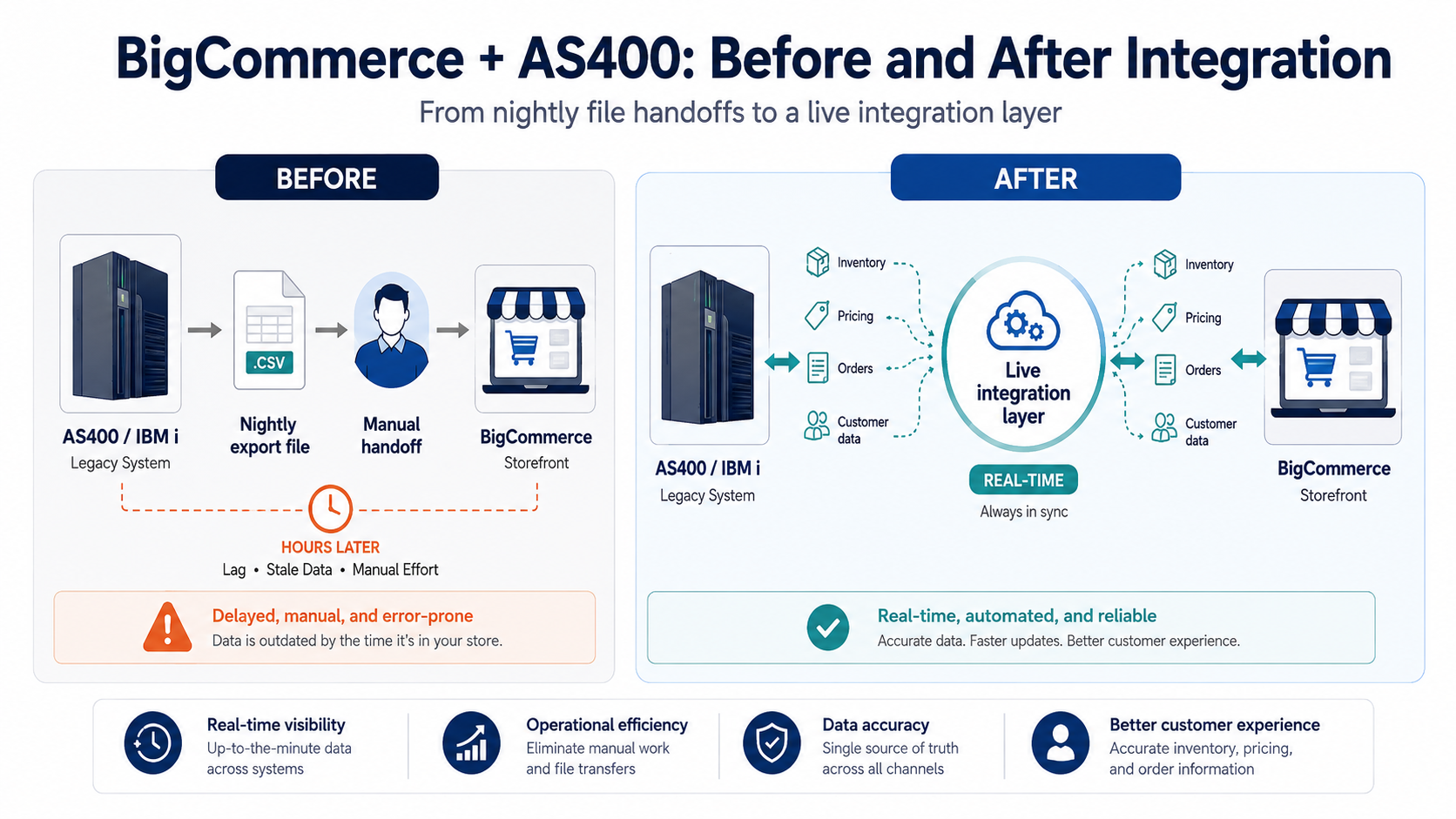
The problem starts when those two systems are not working from the same information.
- Inventory shown online is already outdated
- Web orders have to be re-entered into AS400
- Contract pricing does not reach the storefront
- Customers cannot see their previous orders
- Your teams are working with two versions of the truth
That is where BigCommerce AS400 integration gap becomes a business problem, not just an IT problem. Your team spends time moving data between systems, customers see information that does not always match what your AS400 knows, and sales conversations that should happen online get pushed back to customer service or sales reps.
A buyer may reduce an order because the available quantity looks uncertain. A contract customer may abandon checkout because the price is wrong. A repeat customer may call instead of reordering because their previous purchases are not visible.
None of this necessarily looks like a system failure. Both platforms can still be running exactly as expected. The issue is that the gap between them quietly creates manual work, customer friction, and missed revenue opportunities.
Why This Keeps Happening?
The issue usually is not that AS400 or BigCommerce is failing. It is that the two systems were built to work in very different ways, and the integration has never fully resolved those differences.
Your AS400 is built to run the business. It stores the data, applies pricing and allocation rules, calculates ship dates, and executes logic that may have been refined over decades. BigCommerce is built to serve customers in real time, where product, price, inventory, and order information need to be available immediately.
When those two worlds are connected without a clear integration model, a few problems tend to appear:
- Batch updates create stale storefront data
- Business logic stays trapped inside RPG or COBOL programs
- AS400 data structures do not map cleanly to BigCommerce
- Both systems may compete to own price, inventory, or customer data
- Manual workarounds fill the gaps the integration never solved
That is why a simple file transfer often stops being enough. Pulling a stock quantity from AS400 may be easy, but knowing whether that stock is actually available for a particular customer can depend on allocation rules, customer terms, location, timing, and other logic that lives inside the application.
The same problem shows up with pricing. BigCommerce may need a price immediately, but the real answer may depend on customer-specific agreements or rules that are calculated inside AS400. If the integration only moves the final number and not the logic behind it, the storefront can quickly drift away from the system of record.
Over time, teams usually compensate with manual processes. Files are exported, orders are re-entered, exceptions are handled by one experienced employee, and the process keeps running well enough that the underlying issue never becomes urgent.
The warning sign is when the business starts depending on those workarounds to keep the two systems aligned. At that point, the problem is no longer just missing connectivity. It is that nobody has clearly defined what data moves, when it moves, which system owns it, and which AS400 business rules need to be exposed to BigCommerce.
Why BigCommerce AS400 Integration Is Important?
When BigCommerce and AS400 operate separately, the problem is not that either system is failing. The problem is that every handoff between them becomes something your team has to manage.
Two systems create two versions of the truth
Inventory, pricing, customer accounts, and order information exist in both places, but they are rarely updated at the same moment. The storefront shows what was true when the last file was uploaded. The AS400 shows what is true now.
That is how a customer sees stock online that the AS400 has already allocated, or sees list price while their contract price sits in the ERP. Neither system is wrong. They are just describing different points in time, and the customer is the one who finds out.
Manual handoffs slow down every process
If someone exports inventory, uploads pricing, re-enters orders, or reconciles shipments by hand, the process moves only as fast and as accurately as that person. Orders placed at 4pm wait until the next morning to reach fulfillment. A mistyped part number becomes a return.
As volume grows, those handoffs get harder to manage and more expensive to maintain, and the knowledge of how they work usually sits with one or two people.
Customer self-service depends on live AS400 data
Buyers expect to log in and see accurate availability, their own pricing, order status, shipment details, and what they bought last time. Nearly all of that already exists in the AS400.
Without an integration, BigCommerce cannot reach it at the moment the customer is asking, so the buyer picks up the phone instead. Every one of those calls is self-service that failed.
Sales conversations turn into data entry
When the storefront cannot show contract pricing or reliable stock, your best accounts keep ordering through a rep. Reps spend their time confirming availability and keying in reorders rather than opening new accounts.
The integration is what moves routine repeat business onto the site and frees the sales team for work only they can do.
Growth increases the cost of disconnected systems
More products, customers, channels, warehouses, or markets means more data that has to stay aligned. If the connection still depends on exports and reconciliation, the risk compounds as the business grows.
The workaround holds until volume outgrows it, or until the person who knows the export routine leaves.
Still syncing BigCommerce and AS400 manually?
What You Can Sync Between BigCommerce and AS400
Here's a snapshot of the data that can move between BigCommerce and AS400 to keep your storefront, operations, and customer information aligned.
| Data | Direction | Business impact |
|---|---|---|
| Item master & product records | AS400 → BigCommerce | Keeps SKUs, descriptions, and product attributes consistent |
| Inventory & availability | AS400 → BigCommerce | Shows current stock at product or variant level |
| Pricing & price lists | AS400 → BigCommerce | Makes customer-specific and contract pricing available online |
| Customer accounts | Two-way | Keeps new registrations and existing customer records aligned |
| Web orders | BigCommerce → AS400 | Sends orders into fulfillment without manual rekeying |
| Order status & ship dates | AS400 → BigCommerce | Gives buyers visibility into expected delivery |
| Shipments & tracking | AS400 → BigCommerce | Updates orders with tracking details as goods ship |
| Invoices & payment status | AS400 → BigCommerce | Lets account holders view invoice and payment information online |
| Returns & credits | Two-way | Keeps online RMA activity connected to finance records |
| Variants & SKU-level data | Two-way | Keeps option-level inventory and pricing synchronized |
How Your Peers Are Already Using AS400 and BigCommerce Together
Most distributors and manufacturers running on IBM i have reached the same conclusion. They are not replacing the AS400. They are putting BigCommerce in front of it and letting a live connection carry the data between the two. Here is what that looks like in the businesses already doing it.
01. They stopped uploading stock files and let availability flow through
Companies that made this change pulled availability directly from the AS400 into BigCommerce instead of exporting a file each morning. Buyers now see what can genuinely be ordered, and reps and customers finally look at the same number when they are on a call together.
02. They put contract pricing where the buyer can actually see it
Rather than keeping negotiated rates locked in the ERP, these teams push account pricing and tiered rules into the matching BigCommerce customer account. Their buyers log in and see the price they are entitled to, which is usually what moves a phone-based account online for the first time.
03. They stopped retyping web orders
Orders placed on the storefront now land in the AS400 directly. Fulfillment works from exactly what the customer submitted, and the people who used to rekey those orders every afternoon are doing something else.
04. They handed routine questions back to the customer
Order status, shipment and tracking details, invoices, and purchase history already sat in the AS400. Surfacing that information through the storefront means customers answer their own questions instead of calling in, and service teams handle the exceptions rather than the routine.
05. They kept the AS400 as the system of record
This is the choice that makes the rest possible. None of these companies rebuilt their ERP to improve ecommerce. They use BigCommerce for catalog, account access, ordering, and checkout, while inventory, pricing, customer, and fulfillment logic stay where they have always been. Each platform keeps doing what it does best, and the integration holds the data between them together.
Steps to Connect BigCommerce and AS400
The work usually breaks into four stages. The sequence matters because each step builds the foundation for the next.
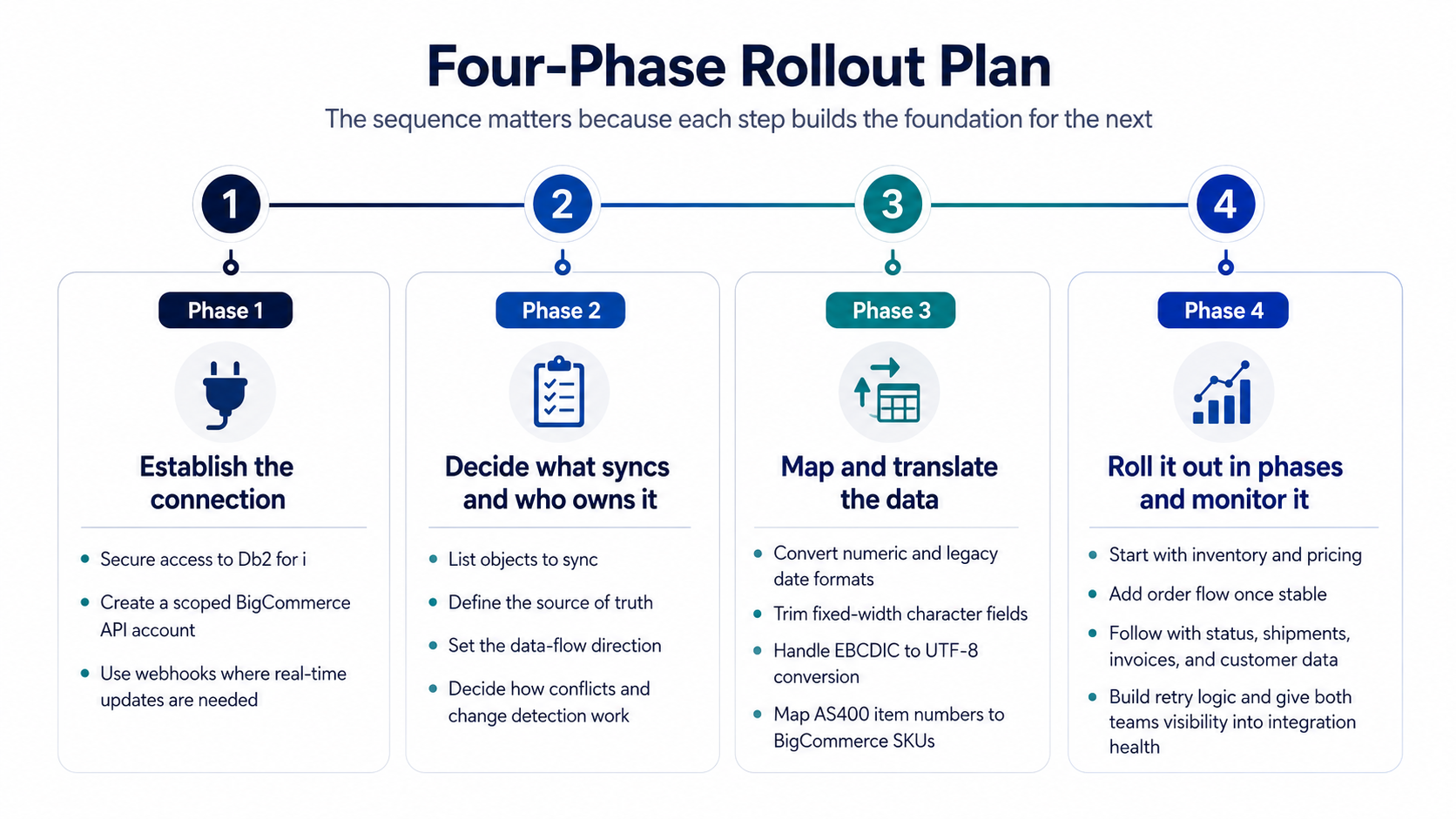
1. Establish the connection
Start by creating secure access between both environments.
- Connect to Db2 for i through JDBC or ODBC using a scoped IBM i user profile
- Limit that profile to only the libraries, files, and actions the integration needs
- Secure the connection through a VPN, SSH tunnel, or controlled network gateway
- Create a BigCommerce API account with only the required scopes
- Configure webhooks for order, product, and customer changes where real-time updates are needed
2. Decide what syncs and which system owns it
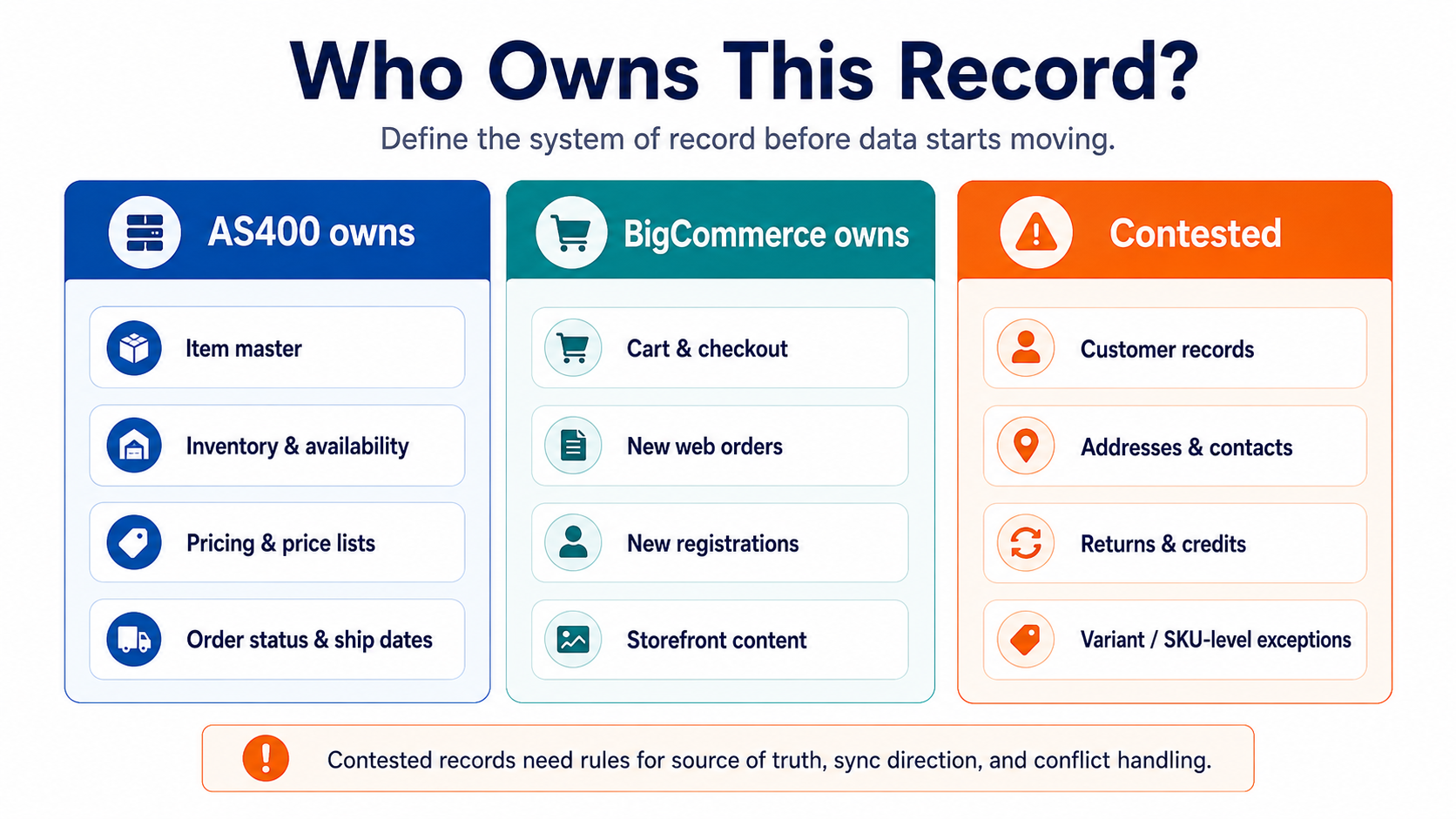
Before moving any data, define who owns each record and how changes should flow.
- List every object you plan to sync
- Define the source of truth for each one
- Set the direction of the data flow
- Decide what happens when both systems change the same record
- Define how changes will be detected, through journaling, CDC, timestamps, or polling
Inventory and pricing will often originate in the AS400, while web activity such as new orders or registrations will usually begin in BigCommerce.
This step prevents integration from becoming two systems constantly overwriting each other.
3. Map and translate the data
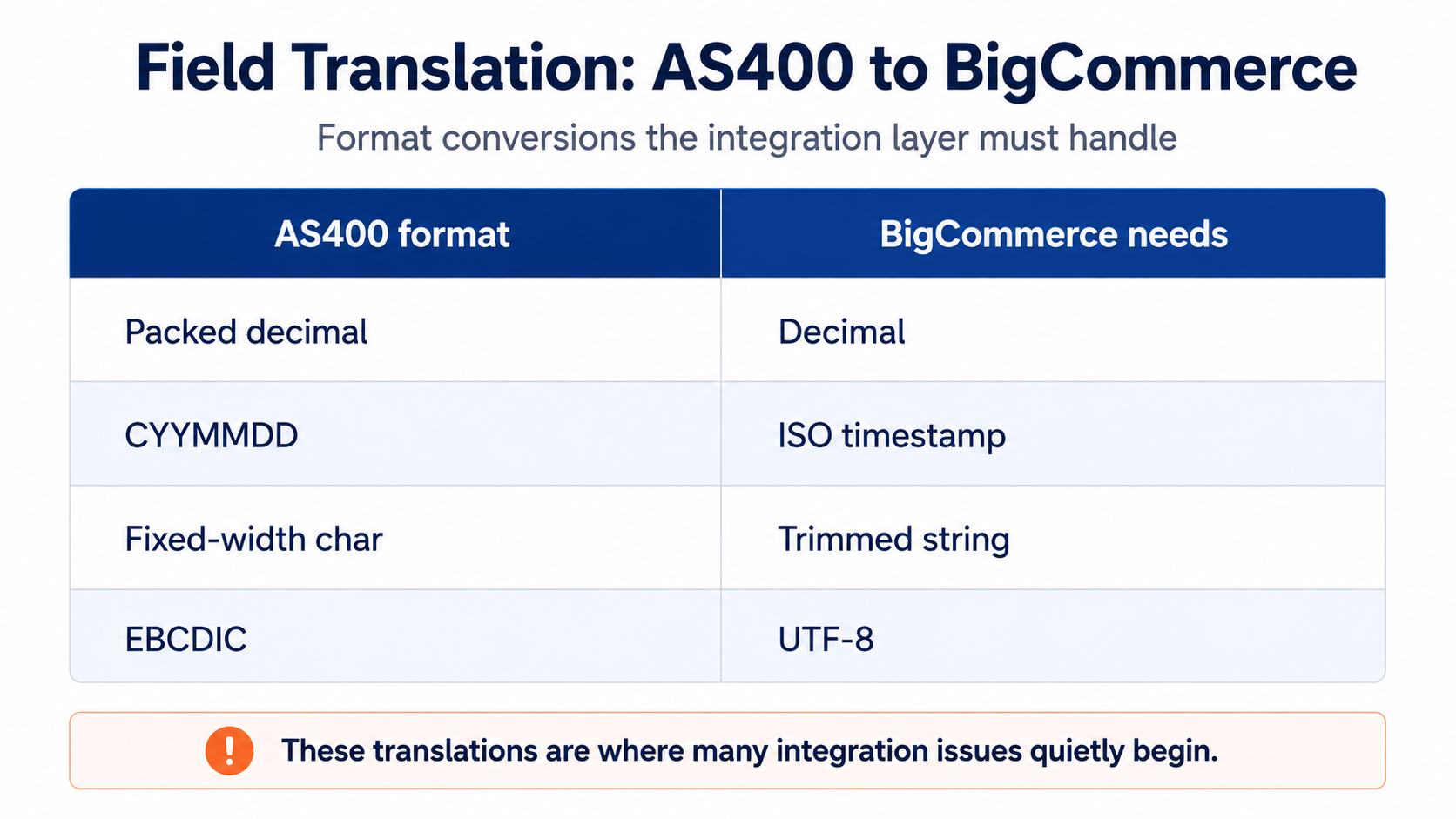
This is where most of the real AS400 integration work happens.
- Convert packed and zoned decimals correctly
- Trim fixed-width character fields
- Translate legacy date formats into usable timestamps
- Handle EBCDIC-to-UTF-8 conversion where required
- Map AS400 item numbers cleanly to BigCommerce SKUs
- Define what blanks, zeros, and legacy default values actually mean
- Clean product descriptions before publishing them online
4. Roll it out in phases and monitor it
Do not try to switch every flow on at once.
- Start with inventory and pricing
- Add order flow once the connection is stable
- Follow with order status, shipments, invoices, and customer data
- Build retry and backoff logic for API limits or temporary failures
- Log failed records and make them easy to replay
- Assign clear owners on both the IBM i and ecommerce sides
- Give both teams visibility into integration health
A phased rollout makes it easier to validate the data, fix edge cases, and learn how the two systems behave together before expanding the integration.
The technical connection is only part of the job. The harder part is understanding the business logic already embedded in the AS400 and deciding how that logic should appear in the online buying experience.
Here's What This Looked Like for One of Our Retail Clients
A North American specialty retail chain came to us with almost this exact situation. Around 40 stores, a Shopify Plus web store, roughly 120,000 SKUs, and about 3,000 online orders a week. The AS/400 ran inventory, pricing, purchasing, point of sale, and warehouse management, and ran all of it reliably.
The connection between the two was the problem. Shopify got its data from a nightly batch extract, so the storefront was always a few hours behind. It kept selling items after the last unit had left a store, which meant cancellations. Price changes made during the day did not reach the site until that night. And every web order was typed into the AS/400 by hand before the warehouse could start.
Replacing a platform was discussed and we advised against it. Neither platform was failing. The way they were connected was.
We built a hybrid integration layer and kept the AS/400 as the system of record. Anything a customer or the warehouse could see moved in near real time. Shopify sent a webhook the moment an order was placed, and the integration layer called the AS/400's own order-entry programs, which we exposed as callable services. Those programs applied their usual checks, reserved stock, and wrote the order themselves. Anything that could wait, such as bulk catalog loads and reporting extracts, stayed on a schedule, with a nightly reconciliation flagging any mismatch before it became an operational problem.
Before any data moved, we agreed the ownership map. The AS/400 kept price, cost, inventory, SKU data, and the final order record. Shopify kept storefront content, accounts, and carts.
Inventory accuracy moved from the 80s into the 90s. Order-to-fulfilment processing got 30 to 40 percent faster. Manual order re-keying disappeared, and the retailer now carries roughly 20 percent less excess and safety stock. The AS/400 stayed exactly where it was, and we still support that environment today.
Want to see another example of our AS400 integration work? Here's how we helped a workwear retailer connect its B2B ecommerce environment with core AS400 systems.
Before We Bid Adieu
Our recent work with a specialty retailer and a B2B workwear provider points to the same conclusion. In both cases the AS400 was doing its job well. The friction sat in the gap between it and the storefront, where stale data, manual order entry, and pricing that never reached the buyer were quietly costing them orders.
Neither company replaced anything. The AS400 stayed as the system of record, and we connected around it. The retailer moved inventory accuracy into the 90s and removed manual re-keying entirely.
Tell us what your AS400 and BigCommerce are struggling to share. Fill in the form below or Book a call, a senior IBM i engineer will review your setup and come back with where your data is breaking, which flows to connect first, and what the effort actually looks like. No pitch deck, no obligation.
Frequently Asked Questions
What is BigCommerce AS400 integration?
BigCommerce AS400 integration is the connection layer that allows a BigCommerce storefront and an IBM AS400 (IBM i) system to share data automatically. Inventory, pricing, product records, and order status flow from the AS400 to BigCommerce, while web orders and customer registrations flow back into the AS400. The AS400 remains the system of record.
Do you need a connector or a custom integration for AS400 and BigCommerce?
Both, usually. Standard product, pricing, inventory, and order flows are well served by established connector patterns. The complexity appears where your AS400 holds customer-specific pricing, product restrictions, fulfilment rules, or custom SKU structures, because those answers are calculated by programs rather than stored in a field. On our AS/400 to Shopify Plus engagement, the integration method was chosen field by field based on the complexity of the actual business rules, rather than forcing everything through one connector. Decide by the rule, not by the platform.
Will the integration slow down our production AS400?
Not if the flows are matched to the need. Sending every record as an individual real-time event puts unnecessary load on the system. The pattern that works is hybrid: near real-time for anything a customer or the warehouse sees, such as orders, availability, and price changes, and scheduled batch for bulk catalog loads, reporting extracts, and reconciliation. Inventory and price lookups are read-only queries, which change nothing on the AS400.
Do we need to modernize or replace the AS400 first?
No. In every engagement of this kind we have run, the AS400 stayed exactly where it was, as the system of record. Replacing it would mean rebuilding years of business logic and introducing risk into the system running inventory, purchasing, and warehouse operations, to solve a problem the platform did not cause. Integration is also the safest first step if modernization is on your roadmap, because it lets you move in phases.
What happens if our files are not journaled?
You have two options, and it is better to know which one applies before you commit to a timeline. Journaling can be enabled, which comes with a storage and performance conversation, or changes can be detected through timestamp-based polling, which works only if the file reliably carries a last-changed timestamp. Older files often do not. Auditing this during discovery takes an afternoon and prevents a mid-project estimate change.
Which system should own customer records?
This is the one genuinely contested object, and it needs a decision rather than a default. The AS400 typically owns price, cost, inventory, SKU data, purchasing, warehouse transactions, and the final order record. The storefront owns storefront content, online accounts, carts, and the web experience. Customer records sit between them, because a buyer updating their shipping address online has changed something finance also maintains. Agree the rule before any data moves. Two systems overwriting each other recreates the exact accuracy problem the integration was meant to fix.
How long does this take, and how is it phased?
It is sequenced rather than switched on at once. Discovery and data-ownership mapping first, then a hybrid integration layer in a pilot region with the existing nightly process kept as a temporary safety net, then real-time order write-back and live pricing, then batch reconciliation for bulk loads, then rollout to remaining locations and fulfilment processes. Running one flow correctly in production teaches you more about your own data than a complete design document will.