
Healthcare runs an enormous amount of manual administrative work. Staff spend their days logging into payer portals, rekeying the same patient details across systems, checking claim statuses, and chasing authorizations. Most of this work is repetitive, rule-based, and high in volume, which makes it a natural fit for automation. The scale of the opportunity is well documented. The 2025 CAQH Index reports that automating administrative transactions helped U.S. healthcare avoid an estimated $258 billion in costs in 2024, and it puts another $21 billion in savings within reach from the transactions that remain manual.
Robotic process automation is the fastest way to capture savings in the back office. It puts software bots on the repetitive work so your people can focus on the exceptions and the patients. This piece walks through five healthcare workflows you can automate today, and for each one, it shows how the same workflow grows into intelligent automation as your product and your needs mature. That path, from dependable features to real intelligence, is where the lasting value sits.
What robotic process automation in healthcare is
Robotic process automation, or RPA, is software that carries out rule-based, repetitive tasks across your existing systems the way a person would, by working through the same screens, portals, and files. It does not replace your EHR, your revenue cycle system, or your payer portals. It works on top of them, which is why teams can deploy it without a long integration project.
RPA is at its best when the work is structured and predictable: clear inputs, defined steps, and a consistent output. When the work involves unstructured documents or judgment calls, plain RPA reaches its limit. That is the point where intelligent automation takes over, adding document understanding and language models so the same workflow can handle the messy cases too. Keep that dividing line in mind as you read the five workflows below, because it tells you where to start with RPA and where to invest in intelligence next.
The five workflows you can automate today
Here are five that deliver quickly, ordered roughly by how fast most teams see a return. Each one pairs what you can automate today with the intelligence upgrade that comes next.
1. Eligibility and benefits verification
Verifying coverage is one of the highest-volume tasks in any practice, and one of the most repetitive. A bot can log into each payer portal, enter the patient and plan details, read back the coverage and benefits, and write the result into your system before the visit. Work that used to tie up a coordinator for minutes per patient runs in the background in seconds. Nalashaa built exactly this kind of automation for a client and cut eligibility verification time by 98 percent.
The intelligence upgrade. Once the checks are automated, a model can flag coverage gaps and prioritize the encounters most likely to cause a denial, so your team looks at the risky ones first instead of all of them.
2. Claims preparation and submission
Preparing a clean claim means pulling data from several places, validating it against payer rules, and submitting it through a clearinghouse. Bots handle the assembly and the checks consistently, catch the obvious errors before submission, and post the statuses that come back. That shortens the billing cycle and cuts the rework that drags on cash flow.
The intelligence upgrade. A model trained on your past claims can predict which ones are likely to be denied and why, so you fix them before they go out rather than after they bounce.
3. Prior authorization requests and follow-up
Prior authorization is slow, manual, and unpopular with everyone involved. A bot can complete and submit the request, then log back in to track its status and surface the ones that need attention. That removes the tedious portal watching and keeps authorizations moving.
The intelligence upgrade. Document understanding can assemble the clinical evidence a payer wants from the chart, and language models can draft the supporting narrative for a person to review, which is where most of the manual time goes today.
4. Patient and records data migration
Whether you are onboarding a new client, replacing a legacy system, or syncing data between platforms, someone usually ends up moving records by hand. Bots move and enter structured data across EHR, revenue cycle, and legacy systems accurately and at volume, without the copy-paste errors that creep in when people work under time pressure.
The intelligence upgrade. Intelligent document processing reads the unstructured inputs that plain RPA cannot, such as scanned forms, faxes, and PDFs, and turns them into structured data your systems can use.
5. Appointment scheduling, reminders, and intake
Scheduling, reminders, and intake are high in volume and easy to get wrong when they are manual. Bots can book and update appointments across systems, send reminders, and route intake information to the right place, which reduces no-shows and takes pressure off the front desk.
The intelligence upgrade. Conversational agents can handle rescheduling and basic questions directly, and route the rest to a person with the context already gathered.
How to handle PHI and security in healthcare RPA
Look again at those five workflows. Every one has a bot logging into a payer portal, reading coverage or clinical data, and moving patient records. That is protected health information, handled by software using real credentials. Security and auditability are not a later step here. They are part of building the bot, and the first question any compliance officer asks is simple: whose credentials does the bot use, and what is the audit trail? Design so the answer is clear from day one.
Give each bot its own identity.
A bot should log in as itself with a dedicated service identity, not with a borrowed human account. That keeps every action attributable to the bot rather than to a person who was not even at their desk.
Grant least-privilege access.
The bot gets only the access the task needs and nothing more, so a single automation cannot reach data or systems outside its job.
Store credentials in an encrypted vault.
Secrets live in a secured credential vault and are injected at runtime, never hard-coded in a script or left in plain text where anyone can read them.
Log every action.
Full activity logging records what the bot did, when, and to which record, which gives you the audit trail a payer or an auditor will ask for and makes it easy to see exactly what happened if something goes wrong.
Confirm BAA coverage.
Any vendor or platform in the automation chain that touches PHI should be covered by a Business Associate Agreement, so the full path the data travels is accounted for.
Build these five in from the first bot and security stops being a blocker. It becomes one of the stronger reasons to automate, because a well-built bot is more consistent and more traceable than the manual process it replaces.
From features to intelligence: where RPA becomes intelligent automation
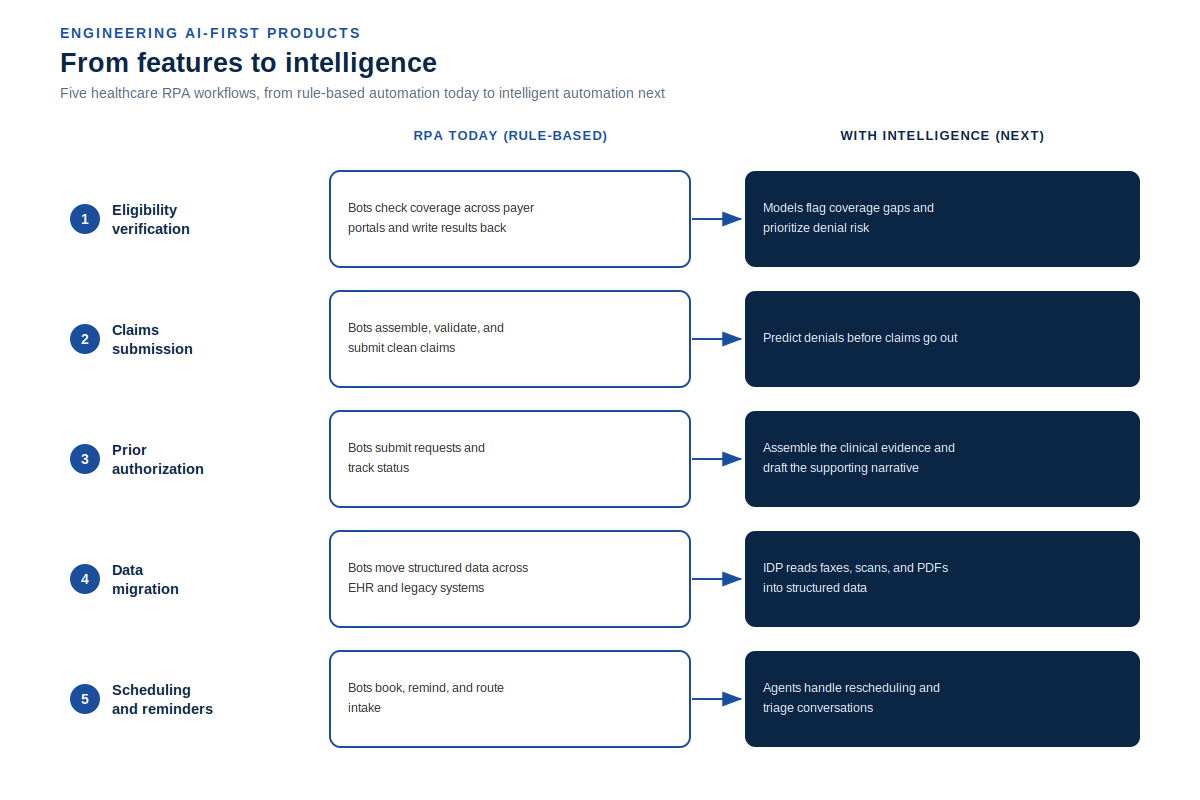
Notice the pattern across all five workflows. RPA delivers the dependable feature today, and intelligence extends it to the cases rules cannot cover. That progression is the whole point, and it is worth planning for from the start rather than bolting on later.
Three moves carry a workflow from rule-based to intelligent. Intelligent document processing lets automation read unstructured inputs, so faxes and scanned forms stop being a dead end. Language model agents handle exceptions and unstructured decisions that would otherwise break a bot or land back on a person. And self-healing automation adapts when a portal or screen changes, which is the failure that quietly stalls most RPA programs. Building with these in mind is the difference between automation that plateaus and automation that keeps compounding. It is the core of how our product engineering teams design automation for the long run.
How to start
You do not need a grand program to get value. A focused first project beats a broad plan that never ships.
- Pick one high-volume, rule-based workflow. Eligibility verification is a common first win.
- Map every step, and every exception. The exceptions are where bots fail quietly, so plan for them up front.
- Plan for portal and interface changes. Build the bot to alert you when a screen changes instead of failing in silence.
- Add intelligence only where the rules run out. Layer in document understanding or agents case by case, not everywhere at once.
- Measure the numbers that matter: cycle time, touch rate, and error rate. Use them to decide what to automate next.
Start narrow, prove the return, and expand from evidence.
Start narrow, prove the return, and expand from evidence.
Where to go from here
If any of these five workflows sound like your team's day, that is where to start. Our robotic process automation services team builds and integrates these automations for HIT vendors and enterprises, then extends them into intelligent automation as the work demands it. You get reliable bots, clean integration with the systems you already run, and a clear path from rule-based features to real intelligence.
Tell us the workflow you would automate first, and we will scope a build that works today and keeps getting smarter.
Frequently asked questions
What is RPA in healthcare? RPA is software that performs rule-based, repetitive tasks across your existing healthcare systems, such as eligibility checks, claims submission, and data entry, by working through the same screens and portals a person would use.
What are examples of RPA in healthcare? Common examples include eligibility and benefits verification, claims preparation and submission, prior authorization, patient and records data migration, and appointment scheduling and reminders.
Is RPA the same as AI? No. RPA follows fixed rules and works best on structured, predictable tasks. AI adds understanding and judgment, which is what lets intelligent automation handle unstructured documents and exceptions that plain RPA cannot.
Will RPA be replaced by AI? RPA is not being replaced so much as extended. The reliable, rule-based core stays useful, and AI layers on top to handle the messy cases. Most teams combine the two as intelligent automation.
Where does RPA stay reliable, and where does it break? RPA is reliable on structured, high-volume, rule-based work. It breaks when inputs are unstructured or when a portal or screen changes without warning, which is why exception handling and resilient design matter from the start.