
If your team has been asked to add an AI assistant to a web app that is already live, the first decision is which pattern to build on. The usual framing, RAG vs fine-tuning, leaves out a third option that matters just as much for an existing product: tool calling. The right choice depends less on the technique than on the job the assistant has to do inside your app. This guide sets out three jobs, matches each to a pattern, and covers what changes when the app already has users, permissions and data. It is written for CTOs and product heads who need to choose an approach before scoping the work.
The three patterns in plain terms
- RAG (retrieval-augmented generation) retrieves relevant content, such as help articles, and passes it to the model along with the user's question. The model then answers from that content (Databricks).
- Tool calling (also called function calling) lets the model ask your app to do something, such as look up an order. The model names the tool and its inputs, and your own code runs it (OpenAI).
- Fine-tuning means training an existing model further on your own examples, so that it changes how it responds, for instance its tone or output format.
The rest of this guide starts with the job your assistant needs to do, then shows where RAG, tool calling, and fine-tuning fit. because soon after this we're giving that decision framework, right?
Start with what the assistant has to do
Pick the job first and the pattern follows. Most requests to "add AI" bundle several jobs together, and each job points to a different technique. Before comparing tools, write down what the assistant should do.
For example: answer questions from the help center, look up a customer's invoices, or draft replies in a consistent tone.
Then sort each item into one of three groups: answering from content, acting in the app, or changing how the model behaves. The sections below take them in that order.
Three jobs, three patterns
The assistant's job decides the pattern: RAG for answering from your content, tool calling for acting in your app, and fine-tuning for changing how the model behaves. The table pairs each job with a pattern, with the source for each row.
| The assistant needs to | Pattern | Why | Running cost and risk |
|---|---|---|---|
| Answer from current or private content, with sources | RAG | Brings knowledge in at query time, lets you restrict access at retrieval, and lets data change without retraining | Indexing, a vector store and embedding upkeep, plus added latency |
| Look something up or act in the app | Tool calling | The model returns the tool name and arguments, and your app runs the operation | Excessive permissions or autonomy, so it needs least privilege and confirmation |
| Change tone, format or task behavior consistently | Fine-tuning | Best for behavior, tone and task structure | High upfront training cost, and outputs that are harder to trace |
| Use a small, static body of information | Prompting | Put the data in the instructions | Does not suit data that changes often |
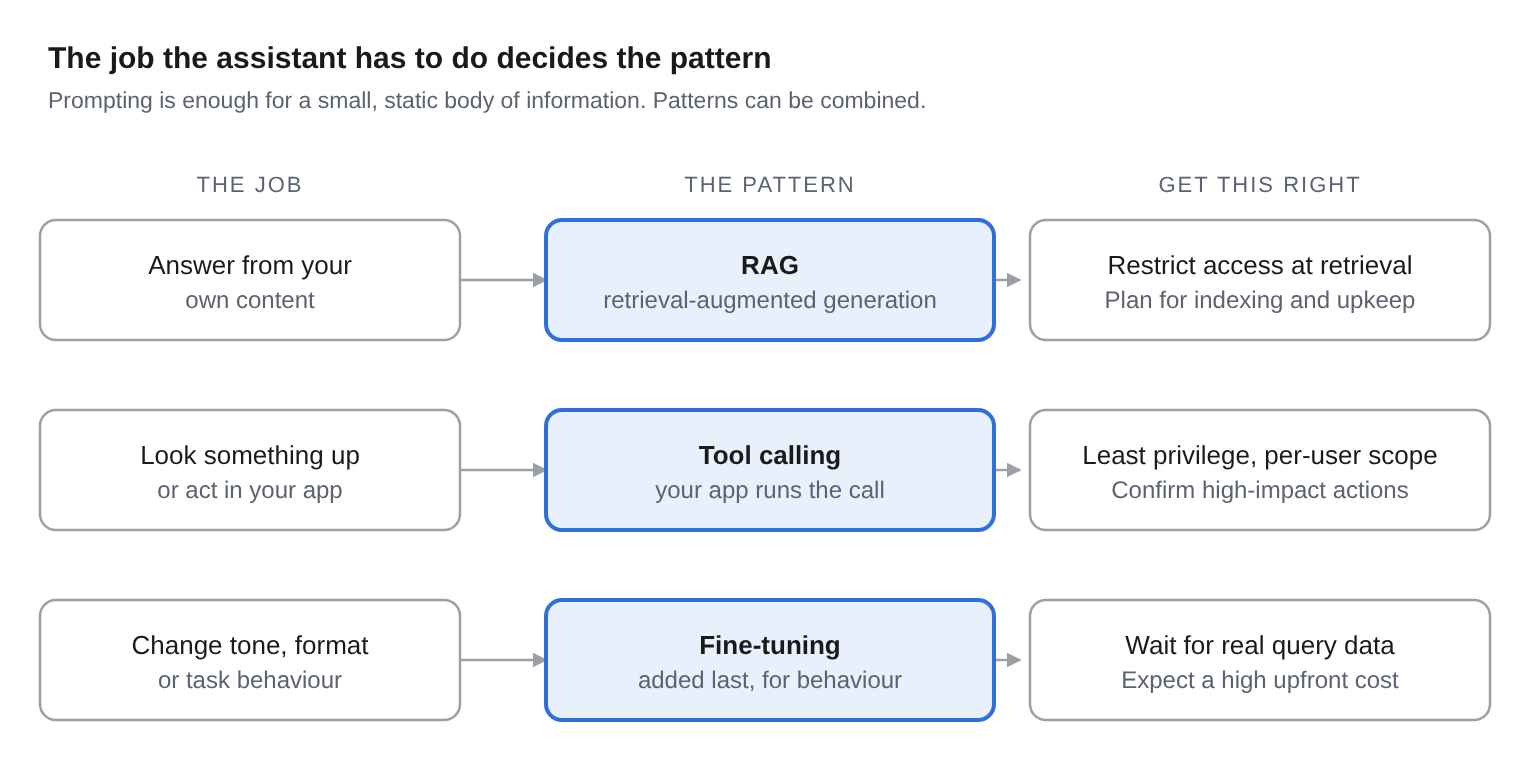
The order we suggest is prompting, then RAG, then tool calling, with fine-tuning last. Databricks recommends RAG before fine-tuning. Extending that sequence to tool calling is our own judgement, and no single source states the whole order.
Answering from your own content: RAG
Use RAG when the assistant must answer from content that changes, or that only some users may see. RAG brings knowledge into the prompt at query time instead of training it into the model. That makes it a fit for changing information and for answers that cite their source. Access can be restricted at the retrieval layer, and data can be updated or removed without retraining .
RAG has its own costs, and they are worth planning for early. It adds indexing, a vector database and embedding upkeep, and the extra steps add latency. IBM also notes that RAG pipelines need a proper data architecture and must not expose personal data to unauthorized users.
We do not quote running costs here, because none of the sources we checked gives a figure that holds for a web app. Estimate it from your own content volume and traffic.
If the question is "what does our content say?", choose RAG. If the question is "how should the model respond?", consider fine-tuning, which is covered below.
Doing things in your app: tool calling
Use tool calling when the assistant has to look something up or do something in your app. In the usual loop, you send the model a list of tools, it replies with a tool call, your application runs it, you send the result back, and the model writes the final answer (OpenAI function calling guide, Anthropic tool use).
The model never runs anything itself in this loop. It returns the tool name and arguments, and your code executes the operation and decides whether to honor the request. Typical uses are fetching data and taking actions such as issuing a refund or sending an email (OpenAI).
This design is why tool calling suits an existing app. Your current APIs become the tools, and your current authorisation checks can decide what each call is allowed to do.
Keep permissions tight
OWASP lists excessive agency as a risk for LLM applications and names three causes: excessive functionality, excessive permissions and excessive autonomy. Its mitigations include least privilege, per-user scoped access, human approval for high-impact actions, and authorisation enforced downstream rather than trusted to the model (OWASP LLM06). For a wider view of constraining agents, see our post on LLM guardrails for reliable AI agents.
Changing how the model behaves: fine-tuning
Fine-tune last, and only to change behavior. Databricks describes fine-tuning as best for behavior, tone and task structure. Google Cloud points to well-defined tasks such as classification or structured output (Google Cloud, May 2024).
It also carries a heavy cost to start. Databricks lists a high upfront training cost and outputs that are harder to trace, and IBM calls fine-tuning compute-intensive (IBM).
For that reason, wait for live traffic. Databricks recommends starting with RAG and then using observed query patterns to build fine-tuning data for the highest-volume flows. Fine-tuning options and pricing differ by provider and change often, so check current terms before you plan.
What changes when the app already exists
An existing app adds three constraints that a demo does not have: permissions, data protection and integration. The recommendations below are our own guidance unless a source is linked.
- Permissions. Retrieval and tool calls should run as the signed-in user, never as a shared service account with broad rights. IBM warns that RAG must not expose personal data to unauthorized users, and OWASP recommends per-user scoped access.
- Data protection. Decide where prompts and retrieved content are sent, what is logged and for how long, and whether the model needs to run in your own environment. Our comparison of self-hosted LLM vs cloud cost covers the trade-offs.
- Integration. The assistant reaches your data through the APIs your app already exposes. Gaps in those APIs, such as missing filters or inconsistent errors, become gaps in the assistant.
Treat these as design inputs before you choose a pattern.
A worked example
Here is how the three patterns split the work in one product. This example is illustrative: a hypothetical care-home software product with payroll and invoicing modules.
| User asks | Job | Pattern | Note |
|---|---|---|---|
| "How do I fix a rejected remittance file?" | Answer from content | RAG | Index the help articles and release notes, and cite the article in the answer |
| "Show invoices over 30 days overdue" | Look something up | Tool calling | A read-only call to the existing invoices API, scoped to the user's organization |
| "Mark these invoices as paid" | Act in the app | Tool calling with approval | A high-impact action, so the user confirms before it runs |
| "Reformat extracted remittance fields to our standard layout" | Change behavior | Prompting first, fine-tuning later | A fine-tuning candidate only once real query volume exists |
The first two rows can ship in the first release. The third follows once logging and approval are in place, and the fourth waits for real query data, which the first release will produce.
How to start
Start with read-only jobs and widen the assistant's reach as you learn how it behaves. Four steps give you a scoped first release:
- List the jobs you want the assistant to do and sort them into content, actions and behaviour.
- Build the read-only jobs first: RAG over your help content and read-only tool calls.
- Add logging and review before any write action, and require user approval for high-impact ones. Our post on LLM observability for multi-model pipelines covers what to track.
- Review real queries after a few weeks, then decide whether any flow justifies fine-tuning.
Before you start, our AI product readiness scorecard shows where your product stands. If you want help scoping this against your own application, see our AI strategy consulting services and custom web application development services.
Have a list of jobs you want your assistant to do?
FAQ
When should I use RAG instead of fine-tuning?
Use RAG when answers must reflect current or private content, cite their source, or respect per-user access. Fine-tuning suits changes to behavior, tone and task structure.
What is the difference between RAG and tool calling?
RAG retrieves content so the model can ground its answer. Tool calling lets the model request an operation, which your app runs to fetch data or take an action. Reading a help article to answer a question is RAG. Fetching one customer's invoices is a tool call.
Do I need to fine-tune a model to add an AI assistant to my app?
Not at the start, since Databricks recommends beginning with RAG and building fine-tuning data from observed queries later. In our view, most assistants can launch without it.
How do I keep an assistant from exposing data the user should not see?
Restrict access at the retrieval layer. Run tool calls with the user's own scoped permissions, and enforce authorisation downstream rather than trusting the model.
Can I combine RAG, tool calling and fine-tuning?
Yes, and Google Cloud notes that these methods can be combined. A common split is RAG for content, tools for actions, and fine-tuning only for stable, high-volume behavior.